
If you want to find YouTube outliers without paying for 1of10, you have more options than you might expect. The catch is that most free tools don't replicate the entire 1of10 workflow. Some are better for channel analytics, some for competitor research, and others for finding emerging topics.
For 2027, the best free approach is not necessarily finding a single tool that copies 1of10. It's building a simple research workflow using YouTube Studio, Social Blade, vidIQ, TubeBuddy, and a few manual checks.
One important distinction: a free alternative should actually be usable without paying. A tool that gives you 7 days free and then requires a subscription isn't really a free 1of10 alternative.
The Best Free 1of10 Alternatives at a Glance
| Tool | Best for | Actually free? | Outlier discovery | Competitor research |
|---|---|---|---|---|
| YouTube Studio | Your own channel and audience | Yes | Manual | Limited |
| Social Blade | Public channel statistics | Yes, with paid upgrades | Manual | Yes |
| vidIQ | Ideas, keywords and YouTube SEO | Yes, limited | Indirect | Yes |
| TubeBuddy | Channel optimization | Yes, limited | Indirect | Limited |
| ViewStats | Competitor and channel analytics | Free access available | Indirect | Yes |
| Manual YouTube research | Finding genuine outliers | Yes | Yes | Yes |
If your only goal is finding videos that massively outperform the channel that published them, manual YouTube research combined with Social Blade or YouTube's own data can be surprisingly effective.
What Makes a Good 1of10 Alternative?
Before comparing tools, it helps to understand what you're actually trying to replace.
1of10 is built around the concept of an outlier: a video that performs dramatically better than the channel's normal baseline. Its current product includes an Outlier Finder alongside features for thumbnail search, channel tracking, niche exploration and AI-generated titles, ideas and thumbnails. Its free plan currently includes outlier search, bookmarks and tracking for up to three channels. 1of10's pricing page lists those features and its current paid plans.
That means there are actually several different jobs hiding inside the phrase "1of10 alternative":
- Finding unusually successful videos
- Studying competitors
- Finding new video ideas
- Understanding what audiences are searching for
- Comparing channel performance
- Analyzing titles and thumbnails
No free tool necessarily does all six well. The better question is: which free tool is best for the specific research you want to do?
1. YouTube Studio — The Best Completely Free Option
If you already own a YouTube channel, start here.
YouTube Studio gives you access to your actual first-party performance data, including views, impressions, click-through rate, watch time, audience retention and other channel-level metrics. YouTube also provides Advanced Mode for comparing performance and exporting analytics data.
More importantly for idea research, YouTube Studio's Trends tab can show what your audience and viewers across YouTube are searching for, helping identify content gaps and potential video ideas.
You can also use your own channel as an outlier database.
How to find outliers in YouTube Studio
- Open your channel analytics.
- Go to your content performance.
- Look at a sufficiently large group of recent videos rather than judging one or two uploads.
- Identify videos that significantly outperform your normal view range.
- Compare those videos against your typical impressions, CTR, watch time and retention.
- Look for patterns in topic, title, thumbnail and format.
YouTube itself recommends looking for patterns across groups of content rather than relying on isolated videos. Its analytics tools let you compare different content types and investigate what your audience interacts with most.
YouTube's official Analytics documentation explains the available reports, while its Trends documentation explains how to use the Trends tab.
The limitation: YouTube Studio is primarily designed around your own channel. It doesn't give you a giant searchable database of every niche's outliers like a dedicated outlier finder does.
Best for: creators who want completely free, first-party data and are willing to do some of the analysis themselves.
2. Social Blade — Best Free Tool for Competitor Research
Social Blade is one of the easiest ways to investigate public YouTube channels without paying for an expensive analytics platform.
You can search channels and inspect publicly available statistics such as subscribers, views, video counts, rankings and historical performance. Channel pages also provide daily statistics that can help you spot sudden changes in views or subscribers.
That makes Social Blade useful for the second half of outlier research.
For example, imagine you discover a small channel in your niche with a video that has 500,000 views. You can use Social Blade to investigate the channel's broader performance and determine whether that video appears to be an isolated spike or part of a larger growth pattern.
How to use Social Blade for outlier research
- Find 10–20 channels in your niche.
- Open their Social Blade profiles.
- Look at their overall views and upload history.
- Identify channels with unusual recent growth.
- Open those channels directly on YouTube.
- Look for individual videos that dramatically exceed the channel's normal performance.
Social Blade isn't an automated 1of10 replacement. It won't simply hand you a ranked list of videos that are 10x above a channel's baseline.
But as a free competitor research layer, it's useful.
Best for: researching channels you already know about and finding unusual growth patterns.
3. vidIQ — Best Free Option for Ideas and SEO
vidIQ approaches YouTube research from a different direction.
Instead of focusing entirely on outliers, it combines keyword research, video ideas, SEO-related tools and AI features. Its free offering has historically included access to a limited set of these tools, making it useful if your research process involves more than just finding viral videos.
That difference matters.
Suppose you find an outlier video titled "I Built a $10,000 AI Business in 30 Days."
A pure outlier tool helps you recognize that the video is unusual.
vidIQ can be useful for exploring related search terms, potential topics and variations around the idea.
You can therefore use the two approaches together:
- Find an interesting outlier.
- Identify the core topic behind it.
- Research related searches and ideas.
- Look for additional videos covering adjacent angles.
- Create a version that fits your own audience.
vidIQ also advertises a free-forever tier with access to selected tools and daily video ideas, although the exact limits and included features can change.
Best for: creators who want to turn research into a broader YouTube SEO and idea-generation workflow.
4. TubeBuddy — Best Free Option for Channel Optimization
TubeBuddy isn't a true outlier finder, and that's important to understand before using it as one.
Its strength is channel optimization. It provides tools that help creators manage and improve their YouTube channels, with some functionality available through its free offering.
So if your goal is specifically:
- "Show me videos that are 20x above their channel average"
TubeBuddy isn't the right tool.
But if your workflow is:
- Find an interesting video
- Study the topic
- Optimize your own upload
- Manage your channel
TubeBuddy can become part of a free research stack.
Best for: creators who need channel optimization tools rather than a dedicated outlier database.
5. ViewStats — Best for Studying Other Channels
ViewStats is another useful option when your research starts with channels rather than individual keywords.
The basic idea is simple: investigate successful YouTube channels, compare their performance and identify videos worth studying.
This makes ViewStats particularly useful when you're doing competitor intelligence.
Instead of searching randomly for viral videos, you can build a list of channels that consistently operate in your niche and monitor what happens when they publish something different.
For example, if a creator normally gets 50,000–100,000 views per video and suddenly publishes something that reaches 1 million, that's a much more interesting research lead than a video from a channel that routinely gets 10 million views.
That distinction is exactly why relative performance matters when looking for outliers.
Best for: creators who prefer channel-level competitive research and performance monitoring.
6. Manual YouTube Research — The Most Underrated Free 1of10 Alternative
This is the method most people overlook.
You don't actually need an outlier-finder database to find outliers.
You can use YouTube itself.
The basic workflow
- Search YouTube for your niche or a specific topic.
- Open channels that repeatedly appear in the results.
- Sort through their recent uploads.
- Compare the view counts between videos.
- Look for videos that are dramatically above the channel's normal range.
- Study the title, thumbnail, topic and format.
- Repeat the process across multiple channels.
Here's a simplified example.
| Video | Channel average | Video views | Signal |
|---|---|---|---|
| Video A | 30K | 42K | Normal |
| Video B | 30K | 55K | Moderate outperformance |
| Video C | 30K | 410K | Strong outlier |
| Video D | 30K | 27K | Normal |
Video C is the one I'd investigate.
But don't stop at the view count.
Ask why that particular video might have broken the channel's normal range.
- Was the topic broader?
- Was the title more specific?
- Did the thumbnail create a stronger curiosity gap?
- Was there a new trend involved?
- Was the creator responding to a recent event?
- Was the video a different format?
- Did it target an adjacent audience?
This is where manual research can actually outperform simplistic "find the highest views" research.
How to Find Outliers Without Paying for Any Tool
If I were building a completely free YouTube research system, I'd use a three-layer process.
Layer 1: Find the channels
Use YouTube search, recommendations and Social Blade to build a list of channels in your niche.
Don't limit yourself to the biggest creators. Smaller channels are often more interesting because a breakout video is easier to identify.
Layer 2: Find the outliers
Go through recent uploads and compare each video's performance with the channel's normal range.
You don't need an exact mathematical formula. You're looking for obvious deviations.
A channel averaging 10,000 views with a 200,000-view upload deserves attention.
A channel averaging 5 million views with a 7 million-view upload probably doesn't.
Layer 3: Reverse-engineer the outlier
This is the part that actually creates value.
Don't copy the video.
Instead, break it into components:
- Topic: What was the viewer actually interested in?
- Promise: What did the title promise?
- Thumbnail: What information did it communicate instantly?
- Format: Tutorial, challenge, story, experiment, commentary, list, etc.
- Angle: What made this version different?
- Audience: Who would specifically click it?
Then ask the most useful question:
"What is the underlying idea here that I can adapt to my own audience?"
A Better Free Workflow Than Trying to Copy 1of10
The biggest mistake is trying to find a free tool that perfectly duplicates 1of10.
That's usually the wrong goal.
Instead, combine tools according to what they're good at:
| Research task | Free tool |
|---|---|
| Analyze your own channel | YouTube Studio |
| Find audience trends | YouTube Studio Trends |
| Research public channels | Social Blade / ViewStats |
| Find keyword opportunities | vidIQ |
| Optimize your channel | TubeBuddy |
| Find actual outliers | YouTube + manual analysis |
This approach also has one major advantage: you aren't dependent on one platform's definition of an outlier.
Don't Confuse High Views With an Outlier
This is one of the most important things to understand about outlier research.
A video with 5 million views isn't automatically a better research opportunity than a video with 500,000 views.
The relevant question is:
How unusual is the video's performance relative to what that channel normally achieves?
For example:
- Channel A averages 20,000 views and gets 500,000.
- Channel B averages 2 million views and gets 5 million.
Channel A's video is arguably the more interesting outlier.
That's because the creator discovered something that dramatically exceeded their established audience baseline.
This is also why simply sorting YouTube by "most viewed" isn't enough.
What About YouTube's AI Tools?
YouTube itself is becoming a more useful free research platform.
As of 2026, YouTube Studio includes Ask Studio, an AI assistant designed to help creators brainstorm ideas, understand channel insights and analyze performance. YouTube says Ask Studio is available to most creators globally through desktop Studio, although access can vary.
YouTube has also been transitioning away from its older Inspiration tab toward Ask Studio for brainstorming. YouTube's Ask Studio documentation explains the current functionality.
The Trends tab is particularly relevant to free idea research because it can show what your audience and viewers across YouTube are searching for and help surface content gaps.
That gives creators something an external tool can't completely replicate: first-party information about their own audience.
Are Free 1of10 Alternatives Good Enough?
Yes, if your main goal is research.
If you want an automated database that continuously identifies outliers across YouTube, applies an outlier score and combines that research with AI packaging tools, free alternatives won't fully replace 1of10.
But if you're primarily trying to answer:
- "What videos are working in my niche?"
- "Which competitors are growing?"
- "What topics should I investigate?"
- "Which videos are performing unusually well?"
- "What patterns can I learn from successful videos?"
You can answer all of those questions without paying for an expensive subscription.
My Pick: The Best Free 1of10 Alternative in 2027
If I had to choose one completely free option, I'd pick YouTube Studio for creators who own a channel.
It gives you first-party performance data, audience information, content comparisons and trend research without requiring another subscription. The biggest limitation is that you have to do more of the outlier discovery yourself.
If your priority is researching other channels, I'd add Social Blade or ViewStats.
And if your priority is finding new topics and search opportunities, vidIQ is worth testing alongside YouTube Studio.
The most effective free setup isn't really one tool. It's:
YouTube Studio + YouTube search + Social Blade + one optional research/SEO tool.
That combination won't give you the convenience of a dedicated outlier database, but it can get you remarkably close to the underlying research process without paying anything.
FAQ
Is there a completely free alternative to 1of10?
Yes. YouTube Studio is the strongest completely free starting point because it provides first-party analytics and audience trend information. You can also manually identify outliers by comparing a channel's videos against its normal performance.
What is the best free tool for finding YouTube outliers?
There isn't currently a free tool that perfectly replicates the automated outlier-finding workflow of 1of10. For completely free research, YouTube itself is the most reliable starting point, while Social Blade and other analytics tools can help you investigate channels and performance patterns.
Can I use YouTube Studio to find viral videos?
YouTube Studio is primarily useful for analyzing your own channel, but its Trends and Analytics features can help you identify content opportunities and understand what is working with your audience. For competitors, you'll need external research or manual YouTube analysis.
Is Social Blade free?
Social Blade provides publicly accessible YouTube statistics and offers paid features as well. Its free access is useful for basic channel and historical performance research, although it isn't a dedicated outlier-finding system.
Is vidIQ a free alternative to 1of10?
vidIQ has a free offering, but it isn't a direct replacement for 1of10. vidIQ is more focused on YouTube SEO, keyword research and content ideas, while 1of10 is specifically built around outlier research and packaging.
What is the cheapest way to find YouTube outliers?
The cheapest method is manual research. Find channels in your niche, compare their recent videos and look for uploads that dramatically outperform their normal view range. You can then use YouTube Studio or free public analytics tools to investigate the pattern.
Should I copy an outlier video?
No. An outlier is a research signal, not a template to duplicate. The useful part is identifying the underlying topic, audience demand, packaging and angle, then developing a new idea that makes sense for your own channel.
One final point: 2027 pricing and feature sets will inevitably change. The safest way to evaluate any "free" 1of10 alternative is to check whether the core research functionality is genuinely available without payment, rather than relying on an old comparison that happens to rank for the keyword.
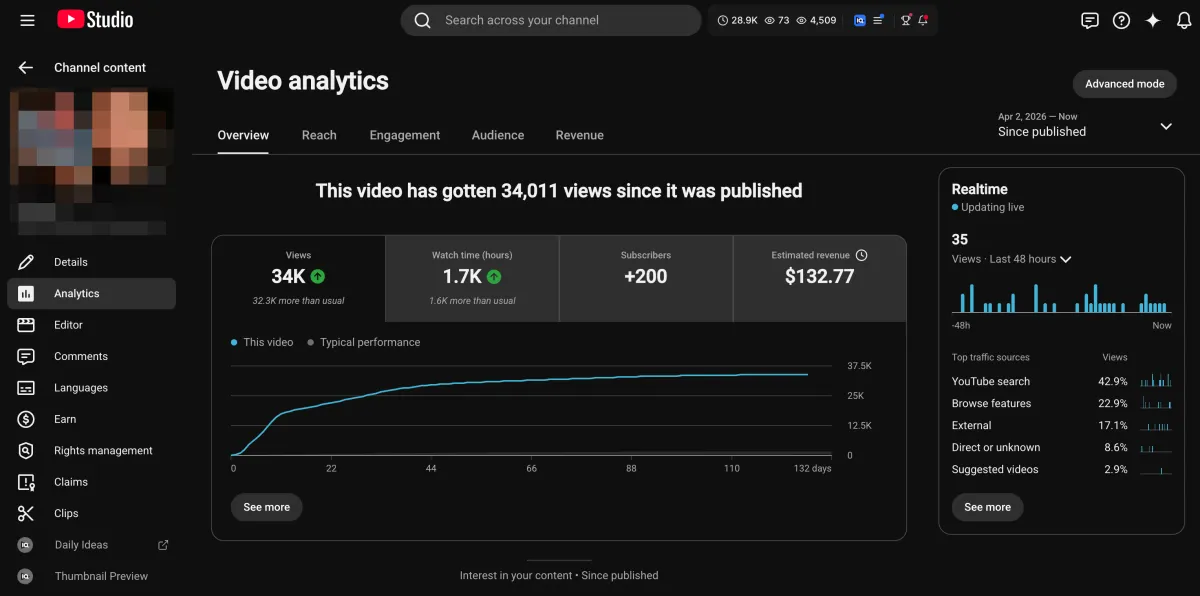
Learn how I turned a $132.77 video into $1000+ per month asset
Full case study on how you can replicate my success with YouTube SEO strategy.
Free downloadThe Zero Audience System
Build permanent YouTube income without a camera or an audience
The full methodology, 31 lessons plus bonuses. Limited spots.