.png)
The best free option isn't a tool you install, it's the one already built into YouTube Studio. The Research tab shows you exactly what your own audience is searching for, pulled from real YouTube data, not an estimate. Everything else on this list, vidIQ, TubeBuddy, Google Trends, the various keyword extensions, fills in the gaps around that first-party data. Here's the ranked breakdown, what each one actually gives you for free, and where the free tier stops being useful.
How I'm Ranking These
Two things actually matter for a free YouTube SEO tool: how specific the data is to YouTube itself, rather than generic web search, and how much you genuinely get before hitting a paywall. A tool with beautiful data that's really just Google search volume dressed up isn't a YouTube tool. And a tool that locks nearly everything behind a plan isn't really free, it's a trial.
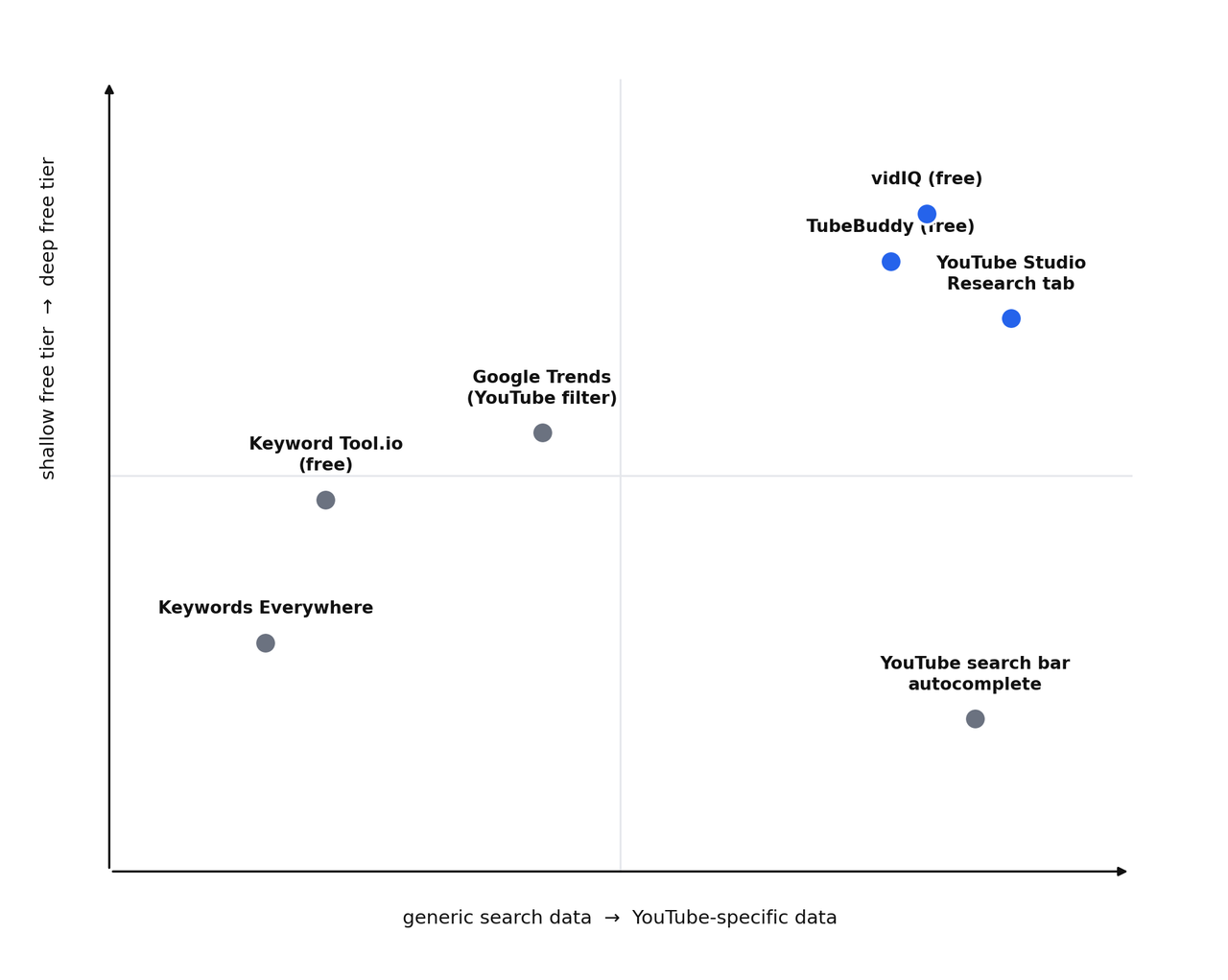
This is the actual best free tool available, and it's not close. It's built by YouTube, shows real search terms people are using to find content in your specific niche, and costs nothing. You'll find it under Studio, then Research, where it breaks down what your audience is searching for, including gaps where demand exists but you haven't published anything yet.
The limitation is scope. It's built around your existing channel and subscriber base, not a blank-slate keyword explorer for a brand new topic. It's the best source of truth for what's already working and what your specific audience wants next, less useful if you're starting completely from zero with no channel history yet.
2. YouTube's Own Search Bar
Before you open any third-party tool, type your topic straight into YouTube's search bar and read the autocomplete suggestions. This is real, live data straight from YouTube's own autocomplete system, reflecting what people are actually typing right now, not a modeled estimate.
It's limited: no search volume numbers, no competition score, just a list of suggested phrases. But it costs nothing, takes ten seconds, and is often the fastest way to sanity-check whether a topic idea has any real search demand behind it before you spend time on deeper research.
3. vidIQ (Free Plan)
vidIQ's free tier adds a keyword scoring system directly into the YouTube interface, showing search volume estimates, competition levels, and related keyword suggestions as you type a title. It also surfaces the tags competing videos are using, which is useful for reverse-engineering why a specific video is ranking.
The free plan caps how much of this you can see, particularly around historical data and the number of videos it'll analyze at once. It's still the most complete free YouTube-specific research tool on this list, the limitations show up once you're doing this at real volume, not in your first few weeks of using it.
4. TubeBuddy (Free Plan)
TubeBuddy's standout feature, even on the free plan, is that its keyword scoring factors in your own channel's size and existing strength in a topic, not just raw competition. A keyword that's brutally competitive for a 500,000-subscriber channel might be genuinely winnable for a 5,000-subscriber one in the same niche, and TubeBuddy's scoring reflects that difference rather than giving everyone the same generic difficulty number.
It's a close second to vidIQ overall. Where TubeBuddy pulls ahead is post-publish optimization, its bulk tools and SEO checklist on existing videos are stronger than what vidIQ's free tier offers in the same area. Where it falls behind is pre-publish research depth, which is vidIQ's stronger side.
5. Google Trends, Filtered To YouTube Search
Google Trends lets you filter results specifically to YouTube search instead of general web search, which turns it into a genuinely useful, completely free way to see whether interest in a topic is rising, flat, or fading over time, and to compare two or three topic ideas against each other before committing to one.
It doesn't give you a search volume number, only relative popularity over time. Treat it as a trend-direction check, not a keyword research tool on its own. It's most useful paired with one of the tools above, not as a replacement for them.
6. Keyword Tool.io (Free Tier)
This one pulls suggestions from YouTube's autocomplete system at scale, generating a long list of long-tail phrase ideas from a single seed keyword, with no login required for basic use. It's a reasonable backup option for casting a wide net on phrase ideas.
It's not YouTube-specific in its scoring or competition data, it's really an autocomplete scraper, useful for idea generation, not for understanding how winnable a keyword actually is on YouTube specifically.
This browser extension shows search volume data directly in the YouTube interface, and it's genuinely useful when it's available to you. The catch: it's increasingly run on a low-cost credit system rather than an unlimited free tier, so treat it as a cheap supplementary tool rather than a fully free one for ongoing, high-volume research.
What I'd Actually Use, In Order
Start every research session in YouTube Studio's Research tab if you already have a channel with some history, it's the most accurate signal you'll get about your specific audience, for free. Cross-check new topic ideas against YouTube's own search bar autocomplete before you open anything else. Once you've got a shortlist of ideas, run them through vidIQ or TubeBuddy's free tier to get a real competition read, and use Google Trends if you're deciding between two similar topics and want to know which one has more room to grow.
Where Free Tools Stop Being Enough
Free tiers are genuinely sufficient for a single channel doing consistent, focused research. They start falling short once you're managing multiple channels, need historical data going back further than the free plan allows, or want bulk processing across dozens of existing videos at once. That's the point where a paid plan on vidIQ or TubeBuddy tends to pay for itself in time saved, not before.
Frequently Asked Questions
Do I need a paid tool to do YouTube SEO properly?
No. A single channel doing consistent, focused keyword research can operate entirely on free tools, particularly YouTube Studio's own Research tab combined with vidIQ or TubeBuddy's free plan. Paid tools save time at scale, they aren't a requirement to rank well.
Which free tool gives the most accurate search volume?
None of the third-party tools show YouTube's actual internal search volume, YouTube doesn't publish that data publicly. They all use estimates built from autocomplete signals, panel data, or proprietary models. YouTube Studio's Research tab is the closest thing to real data, since it's pulled directly from your own channel's actual traffic.
Is vidIQ or TubeBuddy better for free users specifically?
vidIQ's free plan edges ahead on pre-publish keyword research depth. TubeBuddy's free plan edges ahead on post-publish optimization and bulk tools. Many creators end up using both rather than picking one exclusively.
Where To Start This Week
If you're only going to use one thing from this list, open YouTube Studio's Research tab today and actually read what it's telling you. It's free, it's already sitting in your account, and it's the one tool on this entire list built specifically around your own channel's real audience instead of a generic estimate.
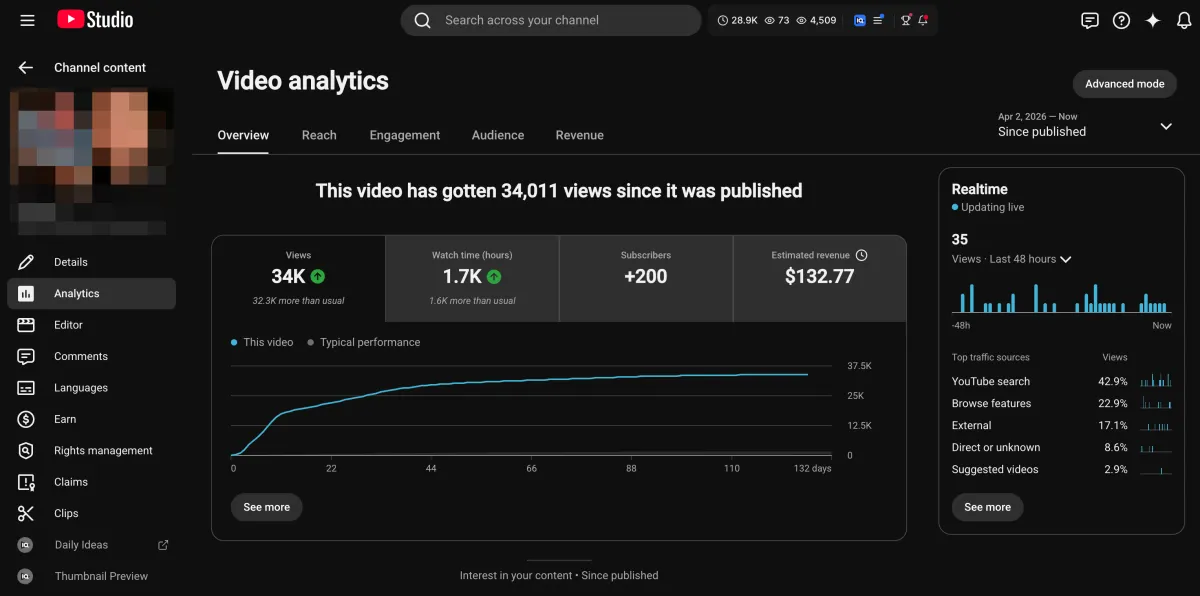
Learn how I turned a $132.77 video into $1000+ per month asset
Full case study on how you can replicate my success with YouTube SEO strategy.
Free downloadThe Zero Audience System
Build permanent YouTube income without a camera or an audience
The full methodology, 31 lessons plus bonuses. Limited spots.