Most of what determines whether a video ranks gets decided in the ten minutes before you click publish, not during editing. Title, thumbnail, description, chapters, the settings buried under "more options," these are the last real chances to hand YouTube's systems clean, specific information about what your video actually is. Skip them and even a genuinely good video is working with a handicap it didn't need.
Here's the actual checklist, in the order it matters, with the specific numbers and reasoning behind each item instead of vague advice to "optimize your metadata."
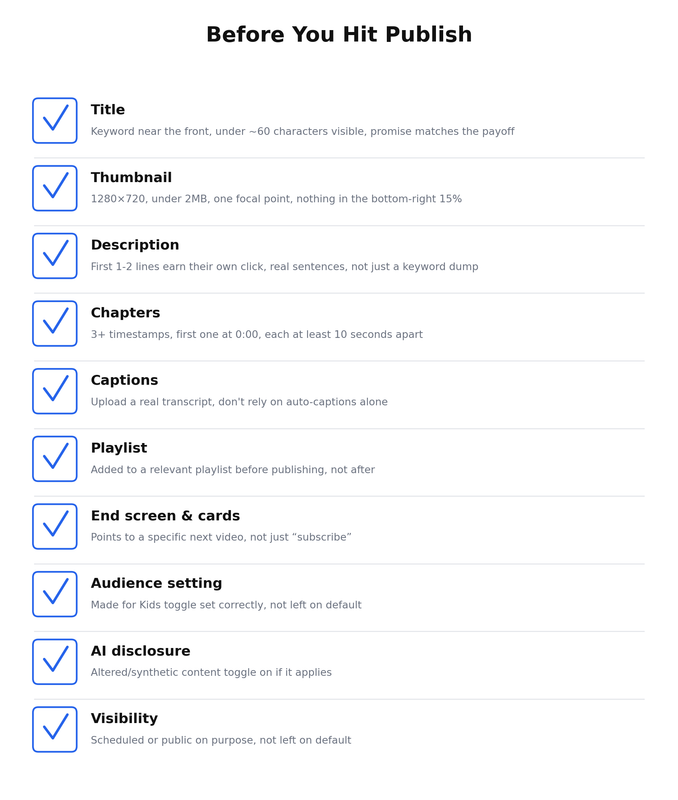
Title: Get The First Few Words Right
YouTube allows up to 100 characters in a title, but that's not the number that matters most. On search results and many mobile views, titles get visually truncated well before that, practically speaking, aim to say the important part in the first 60 to 70 characters, and put your actual keyword or topic near the front rather than the end.
The bigger mistake isn't length, it's mismatch. A title that promises something the video doesn't fully deliver tanks retention, and retention is one of the strongest signals feeding into whether YouTube keeps recommending the video afterward. Write the title to match exactly what happens in the video, not a slightly exaggerated version of it.
Thumbnail: The Technical Specs That Actually Matter
YouTube's current baseline thumbnail size is 1280×720 pixels at a 16:9 ratio, with 4K (3840×2160) now the officially recommended resolution for future-proofing against higher-density screens. File size limits currently sit at 2MB on mobile uploads, with a larger 50MB allowance rolling out on desktop, though staying under 2MB is still the safest target regardless of which device you're uploading from.
| Spec | Recommendation |
|---|---|
| Dimensions | 1280×720 minimum, 3840×2160 for future-proofing |
| Aspect ratio | 16:9 |
| File size | Under 2MB to be safe across devices |
| Format | JPG at 85-90% quality strikes the best size-to-quality balance |
One detail that trips people up constantly: YouTube automatically overlays the video's duration in the bottom-right corner of every thumbnail, and you have no control over removing it. Anything important, text, a face, a key visual element, placed in that bottom-right corner gets partially covered. Design around it, not through it.
Beyond the technical spec, one focal point beats a busy thumbnail every time. A single face, object, or moment reads clearly at the small size thumbnails actually get viewed at. If your thumbnail text just repeats your title word for word, you're wasting the one piece of visual real estate that could be adding something the title doesn't already say.
Description: The First Two Lines Do Almost All The Work
YouTube allows up to 5,000 characters in a description, but only the first line or two show before a viewer has to click "show more." That first visible portion needs to read as real, useful sentences, not a wall of keywords, because it's doing double duty: convincing a viewer to actually watch and giving search systems clear, specific context about what the video covers.
Past that first visible section, use the rest of the space for a fuller summary, relevant links, and timestamps if you haven't added formal chapters. Don't leave it empty just because most people won't scroll down, the full text still gets indexed.
Chapters: Worth Adding Even For Shorter Videos
Chapters require a minimum of three timestamps, each at least 10 seconds apart, with the first one starting at 0:00. Once those conditions are met, YouTube automatically generates a visual chapter bar on the video's timeline.
Beyond the obvious navigation benefit, chapters give search systems an explicit, labeled structure of what happens in the video and when, which is more precise information than a system trying to infer structure from a transcript alone. If your video has a couple of genuinely distinct sections, it's worth the two extra minutes to add them before publishing rather than going back later.
Captions: Don't Trust Auto-Generated Captions Alone
YouTube auto-generates captions on most uploads, and they're good enough to rely on for accessibility in a pinch, but they're not accurate enough to be the only version of your video's spoken content that search systems see. Names, technical terms, and niche vocabulary are exactly where auto-captions tend to get things wrong, and those are often the most important words in the video for search relevance.
Uploading your own accurate transcript or corrected caption file, even a rough one, closes that gap. It costs a few minutes and directly improves how precisely your spoken content gets matched to search queries.
Playlist: Add It Before You Publish, Not After
Getting a new video into a relevant playlist immediately, rather than as an afterthought days later, means it starts contributing to session behavior from the moment it goes live. A viewer who finishes one video and rolls into the next one in a playlist extends the viewing session, and that session contribution is one of the stronger signals in how content gets recommended further. A video sitting alone with no playlist has no built-in path to keep someone watching once it ends.
End Screens And Cards: Point Somewhere Specific
The default end screen suggestion is often just "subscribe" or a generic "watch more" prompt. That's a missed opportunity. Point the end screen and any mid-video cards at a specific, related video, ideally one that answers the natural next question a viewer would have after watching this one. A specific next step converts into another view far more reliably than a generic call to action.
Audience Setting: Don't Leave It On Autopilot
The "Made for Kids" designation isn't just a checkbox, it changes what features are available on the video, including comments, notifications, and some monetization options. Set it deliberately based on your actual content, not whatever the default happens to be, since misclassifying it in either direction creates real problems, either compliance issues or unnecessarily losing access to features your video should have.
AI Disclosure: Check This Even If You're Not Fully Automated
If any part of your video uses realistic AI-generated or altered content, YouTube requires the "Altered or synthetic content" toggle to be switched on in the upload flow. This applies even if AI only touched part of the video, not the whole thing. Skipping this disclosure is treated as a policy issue on its own, entirely separate from how good or authentic the finished video looks.
Visibility And Scheduling: Make The Choice On Purpose
Decide whether a video goes public immediately or gets scheduled, rather than defaulting to whatever the upload flow suggests. Scheduling around when your specific audience is actually active matters more for content relying on an early recommendation push. For search-driven, evergreen content, the exact publish time matters far less, since the video's long-term performance depends on ongoing search demand, not the first few hours of visibility.
What I'd Prioritize If I Only Had Ten Minutes
If you're genuinely short on time before publishing, do these four things and accept the rest as a slightly weaker version: get the title's first 60 characters right, make sure the thumbnail has one clear focal point and stays under the file size limit, write two real sentences at the start of the description, and toggle the AI disclosure if it applies. Everything else on this list compounds your video's performance. Those four determine whether it gets a fair shot at all.
Frequently Asked Questions
Do tags still matter for YouTube SEO?
Less than they used to. Tags mainly help YouTube disambiguate an unclear title rather than functioning as a major ranking lever on their own. Spend your limited time on the title, thumbnail, and description first.
Should I publish immediately or use the scheduling feature?
For evergreen, search-driven content, the exact time matters far less than for content depending on an early recommendation spike. Scheduling is more valuable when you know your specific audience is active at a certain time and you're relying on that early push.
Is it worth adding chapters to a short video?
If the video has at least three genuinely distinct sections with at least 10 seconds of separation, yes. If it's a single continuous explanation with no natural breaks, forcing chapters in doesn't add much.
What happens if I forget the AI disclosure toggle?
It's treated as a policy issue on its own, separate from the video's actual quality or authenticity. If your video includes realistic AI-generated or altered content and you skip the disclosure, that's a real risk worth avoiding, not a minor technicality.
The Four Minutes That Matter Most
Most creators spend hours on editing and minutes on the upload screen, when it's often the reverse ratio that would actually move the needle. Run this checklist the same way every time you publish, not just when you remember to. Consistency here compounds the same way consistency in your actual content does, a channel that nails this on every upload builds a cleaner, more legible signal for search systems than one that nails it occasionally.
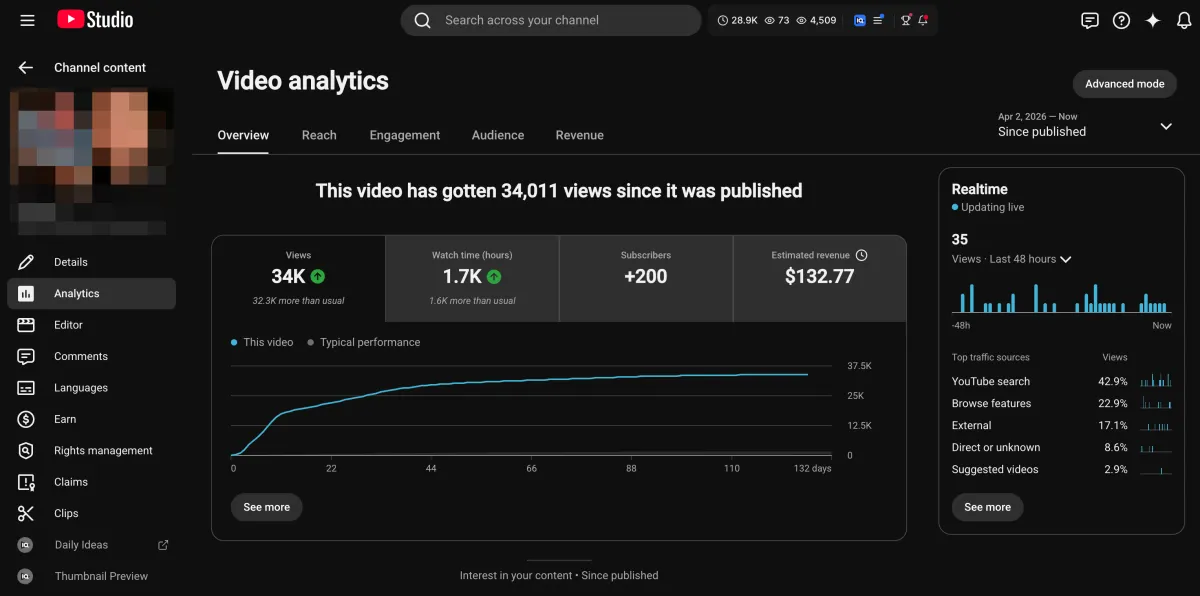
Learn how I turned a $132.77 video into $1000+ per month asset
Full case study on how you can replicate my success with YouTube SEO strategy.
Free downloadThe Zero Audience System
Build permanent YouTube income without a camera or an audience
The full methodology, 31 lessons plus bonuses. Limited spots.