
ViewGrip is a YouTube promotion and traffic-exchange platform that lets creators put their videos in front of other ViewGrip users in exchange for platform coins. Those coins can be earned through activities on the platform and then spent on campaigns designed to generate views and other forms of engagement.
Unlike a traditional YouTube advertising platform, ViewGrip is built around a creator-to-creator exchange model. You can create a campaign using a public YouTube video URL, configure how viewers should interact with it, and use ViewGrip's coin system to fund the campaign. ViewGrip also offers creator tools such as content ideas, tag optimization, thumbnail creation, and AI-assisted content features.
However, there's an important distinction between getting exposure through a traffic-exchange platform and getting genuine organic growth from people who independently choose to watch your content. YouTube explicitly prohibits artificial engagement and warns that incentivized or artificial traffic can be filtered or treated as invalid.
What Is ViewGrip?
ViewGrip is a platform designed to help YouTube creators promote videos through a user-based traffic exchange. The basic idea is simple: users interact with other creators' content to earn ViewGrip coins, and those coins can then be used to promote their own videos.
ViewGrip describes itself as a platform built around registered user activity rather than automated view bots. Its current terms also make clear that ViewGrip does not sell or guarantee a specific number of YouTube views, subscribers, likes, comments, watch time, rankings, or monetization.
That makes ViewGrip different from a conventional YouTube analytics platform such as Viewstats. ViewGrip's primary purpose is promotion and creator activity, not competitor research or channel analytics.
How Does ViewGrip Work?
ViewGrip uses a coin-based system. You can earn coins by participating in the platform and then spend those coins on campaigns for your own videos.
The basic workflow looks like this:
- Create a ViewGrip account.
- Add a public YouTube video to a campaign.
- Choose campaign settings such as viewing duration and engagement options.
- Earn or purchase ViewGrip coins.
- Use those coins to run the campaign.
- Monitor the resulting activity through ViewGrip and YouTube Analytics.
ViewGrip's own documentation says that campaigns can be configured with minimum and maximum viewing durations, campaign speed, viewing method, likes, subscriptions, comments, geographic filtering, and daily or total coin budgets.
1. You Add a YouTube Video
To create a campaign, you provide the URL of the YouTube video you want to promote. ViewGrip's current workflow does not require you to hand over your YouTube or Google password just to create a campaign.
This is useful from an account-security perspective because you aren't giving a third-party promotion service direct access to your Google credentials.
2. You Configure the Campaign
ViewGrip gives you more control than simply entering a video URL and pressing a "get views" button.
According to its campaign documentation, you can configure:
- Watch duration: Set a minimum and maximum viewing duration.
- Campaign speed: Control how quickly campaign activity is delivered.
- Viewing method: Choose direct, keyword, channel-page, or random discovery methods.
- Likes: Allow or disable like interactions.
- Subscriptions: Allow or disable subscription interactions.
- Comments: Allow comments and provide a list of comments when applicable.
- Geographic targeting: Filter traffic by country when available.
- Daily budget: Limit the number of coins a campaign can consume per day.
- Total budget: Set a maximum coin allocation for the campaign.
The exact options available can depend on your ViewGrip account and membership configuration.
3. You Earn Coins
Coins are the internal currency used by ViewGrip.
The platform's Worker feature is one way to earn them. ViewGrip's documentation says the Worker can automate tasks such as watching videos, liking, commenting, and subscribing, with users receiving coins for completing those activities. The Worker uses a browser extension and can run while the user is logged into ViewGrip.
This creates the central loop behind the platform:
You interact with other creators' content → you earn coins → you spend those coins promoting your own content.
4. Your Campaign Uses Those Coins
Once your campaign is active and has an available coin balance, ViewGrip allocates the campaign according to its settings.
The amount of activity isn't simply a fixed "1 coin = 1 view" system. ViewGrip says campaign costs can vary according to factors such as viewing duration, likes, subscriptions, comments, and other campaign settings.
What Is the ViewGrip Worker?
The Worker is one of the most important parts of ViewGrip because it provides a way to generate coins without necessarily buying them.
ViewGrip says the Worker can automatically perform tasks on YouTube, including watching videos and interacting with them. Users install the ViewGrip browser extension, launch the Worker, and earn coins as the system assigns activities.
This is what makes ViewGrip a traffic exchange rather than simply a paid promotion service.
You're effectively contributing attention to the ecosystem in order to receive promotional exposure for your own content.
Is ViewGrip Actually Free?
Yes, ViewGrip has a free membership tier, although it also offers paid memberships.
As of September 2026, ViewGrip lists a Basic plan at $0, a Silver plan at $9, and a Premium plan at $14. The paid plans increase campaign allocations, Worker allocation, campaign priority, daily rewards, and access to creator tools.
| Plan | Price | Campaign allocation | Worker allocation |
|---|---|---|---|
| Basic | $0 | 10 | 2 |
| Silver | $9 | Unlimited | 3 |
| Premium | $14 | Unlimited | 5 |
The paid plans also include increasing daily limits for ViewGrip's content creation, content blueprint, content ideas, tag optimizer, and thumbnail tools.
It's worth paying attention to what you're actually buying. ViewGrip's membership page explicitly states that purchasing a membership or coin balance does not guarantee a particular number of YouTube views, subscribers, likes, comments, watch time, rankings, or monetization results.
Does ViewGrip Give You Real YouTube Views?
ViewGrip says its system is based on registered users rather than automated view bots. Its website describes the platform as a real-user promotion system, and its Google Play listing describes the service as a traffic exchange in which users earn engagement through participation.
But "real users" doesn't automatically mean organic audience.
That's the key distinction.
A person can be a real human being and still watch a video because they are completing an incentivized task rather than because they genuinely want to consume that particular content.
That matters because YouTube evaluates engagement quality independently. YouTube says it does not allow artificial increases in views, likes, comments, or other metrics, including activity generated through systems that incentivize engagement. It also says traffic can be identified as invalid regardless of where it originated.
Is ViewGrip Safe for YouTube?
This is the part I would take seriously before using ViewGrip on a channel you care about.
ViewGrip and YouTube are separate platforms, and ViewGrip cannot guarantee that YouTube will accept or retain the activity generated through its system. ViewGrip's own terms explicitly acknowledge this distinction.
YouTube's fake engagement policy says creators must not artificially increase views, likes, comments, or other metrics. It specifically mentions third-party services that artificially inflate metrics and says that policy violations can result in content removal or channel termination.
YouTube also states that automated or incentivized traffic from third parties can qualify as invalid traffic. If significant invalid traffic is detected, consequences can include adjustments to views or earnings, limited ad serving, demonetization, or action against an associated AdSense account.
So I would not treat ViewGrip as a risk-free way to "hack" YouTube's algorithm.
ViewGrip Does Not Guarantee Better YouTube Rankings
One of the easiest mistakes to make is assuming that more views automatically mean better rankings.
They don't.
YouTube independently validates engagement metrics, and its systems can adjust metrics when activity is determined to be illegitimate. YouTube also describes views in Analytics as legitimate views rather than simply every play generated somewhere on the internet.
ViewGrip's own terms are consistent with this limitation: the service provides its internal coins, memberships, and features, while YouTube independently decides whether external activity is counted, retained, or acted upon.
That means a campaign can generate activity without producing the outcome you actually care about: more people genuinely interested in your channel.
What Is ViewGrip Good For?
ViewGrip makes the most sense when you understand it as a promotion and traffic-exchange tool, not as an organic-growth shortcut.
Its useful features include:
- Getting a video in front of additional users.
- Testing the platform's campaign controls.
- Using a coin-based promotion system instead of paying directly for every campaign interaction.
- Targeting certain countries when the relevant filtering features are available.
- Controlling viewing duration and campaign pacing.
- Accessing basic creator productivity tools alongside promotion features.
The platform also provides tools for content ideas, blueprints, tag optimization, thumbnails, AI keywords, and AI comments depending on membership level.
What ViewGrip Is Not
ViewGrip isn't a replacement for YouTube Studio, YouTube Ads, or a YouTube SEO research platform.
It doesn't control YouTube's recommendation system, and it can't guarantee monetization or organic growth.
It also shouldn't be confused with an analytics tool designed to tell you why competitors' videos are performing well. If your primary objective is finding viral topics, analyzing competitors, researching outliers, or improving your content strategy, you'd need a different category of tool.
ViewGrip's job is primarily distribution through its own creator ecosystem.
ViewGrip vs. YouTube Ads
ViewGrip and YouTube Ads solve very different problems.
| ViewGrip | YouTube Ads | |
|---|---|---|
| Primary model | Traffic exchange | Paid advertising |
| Payment system | Coins and memberships | Advertising budget |
| Audience selection | Platform campaign settings | Google/YouTube advertising targeting |
| Organic ranking guarantee | No | No |
| Direct YouTube advertising product | No | Yes |
If you're trying to buy legitimate advertising exposure, YouTube Ads is the more conventional route. If you're specifically interested in experimenting with a creator traffic-exchange system, that's where ViewGrip fits.
How I Would Evaluate ViewGrip Before Using It
If you're considering ViewGrip for an important YouTube channel, don't judge it by the public view counter alone.
Look at what happens after the campaign.
- Check traffic sources. Look at where the new viewers are coming from inside YouTube Analytics.
- Check audience retention. A large increase in views with extremely weak retention isn't necessarily useful.
- Watch subscriber behavior. See whether new subscribers actually return for future videos.
- Monitor returning viewers. This is more meaningful for long-term channel development than a temporary increase in views.
- Watch for metric adjustments. YouTube can validate and adjust engagement after it occurs.
- Keep monetized channels especially conservative. YouTube's policies around invalid traffic and artificial engagement can directly affect monetization.
YouTube provides audience metrics such as new viewers, casual viewers, regular viewers, returning viewers, unique viewers, watch time, and legitimate views through Analytics. Those metrics give you a much better picture of whether promotional activity is actually helping your channel.
Does ViewGrip Require Your YouTube Password?
According to ViewGrip, no. Its campaign workflow is based on the public URL of the YouTube video you're promoting rather than requiring your Google password.
That doesn't mean every ViewGrip feature is completely independent of YouTube. The service has browser-extension functionality and features that interact with YouTube, and its terms state that users must comply with YouTube's applicable terms when using features that use YouTube API Services.
Does ViewGrip Work?
ViewGrip can deliver activity to a YouTube video through its traffic-exchange system, but that is not the same thing as proving that it creates sustainable organic channel growth.
The platform itself provides controls for campaigns and describes its users as real people. At the same time, YouTube independently decides which engagement is legitimate and explicitly prohibits artificial or incentivized engagement under its policies.
So the more useful question isn't simply "Does ViewGrip give me views?" It can generate campaign activity. The better question is whether those viewers become the type of audience you actually want.
If they don't watch your future videos, don't return to your channel, and don't have genuine interest in your topic, a larger view number doesn't solve the underlying growth problem.
Frequently Asked Questions
What is ViewGrip used for?
ViewGrip is used to promote YouTube videos through a traffic-exchange system. Users can create campaigns, earn or use ViewGrip coins, and configure viewing and engagement options.
Is ViewGrip free?
Yes. ViewGrip currently offers a free Basic membership, with paid Silver and Premium memberships providing additional limits and features.
How do you earn ViewGrip coins?
One of the main methods is the Worker feature, which ViewGrip says rewards users with coins for completing activities such as watching videos and interacting with content.
Does ViewGrip guarantee YouTube views?
No. ViewGrip's current terms explicitly state that purchases do not guarantee a specific number of YouTube views, subscribers, likes, comments, watch time, rankings, or monetization.
Are ViewGrip users real people?
ViewGrip says its platform is built around registered users rather than automated view bots. However, a real person interacting with content through an incentivized traffic-exchange system is not necessarily equivalent to an organic viewer who independently discovered and wanted to watch the video.
Is ViewGrip allowed by YouTube?
YouTube's policies prohibit artificially increasing views, likes, comments, subscribers, or other metrics, including certain incentivized or third-party engagement schemes. ViewGrip's own terms acknowledge that YouTube independently decides whether activity is counted or acted upon.
Final Verdict: What Is ViewGrip Really?
ViewGrip is best understood as a YouTube traffic-exchange and creator-promotion platform. Its core mechanism is straightforward: participate in the ecosystem to earn coins, spend those coins on campaigns, and expose your videos to other users.
The interesting part is that ViewGrip offers considerably more campaign control than a basic "free YouTube views" website. You can configure viewing duration, pacing, discovery methods, engagement types, budgets, and targeting depending on the account and membership.
But don't confuse traffic exchange with organic audience growth.
If you're considering using ViewGrip, the biggest question isn't how many views you can generate. It's whether the resulting audience is genuinely interested in your content and whether YouTube considers the resulting activity legitimate.
For a serious or monetized channel, that distinction matters. YouTube explicitly prohibits artificial engagement and can filter or take action against invalid activity.
Use ViewGrip, if at all, as a promotion experiment—not as a substitute for a strong topic, thumbnail, title, retention, and genuine audience demand.
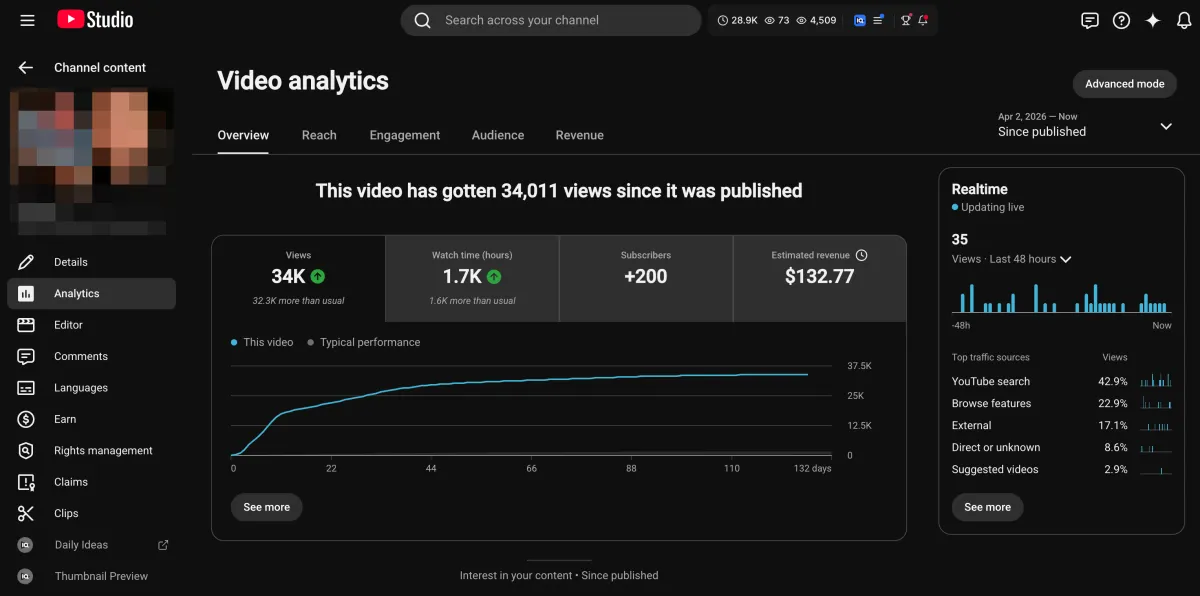
Learn how I turned a $132.77 video into $1000+ per month asset
Full case study on how you can replicate my success with YouTube SEO strategy.
Free downloadThe Zero Audience System
Build permanent YouTube income without a camera or an audience
The full methodology, 31 lessons plus bonuses. Limited spots.