You don't need editing skills, a camera, on-camera confidence, or any prior YouTube experience to start a faceless channel this week. What you actually need is a topic you can commit to for a few months, one free or nearly free tool for each part of the production process, and a willingness to publish something imperfect rather than wait until you feel ready. Here's the exact path from nothing to your first published video, and what "zero experience" actually means once you break it down.
What "Zero Experience" Actually Means Here
Being honest about this upfront saves you weeks of unnecessary hesitation. You don't need video editing skills, the free tools available now handle most of the technical work for you. You don't need to be comfortable on camera, that's the entire point of a faceless channel. You don't need expensive equipment, a laptop and free software cover everything for your first several videos. And you don't need existing YouTube knowledge, algorithm behavior, SEO mechanics, all of it is learnable as you go.
What you do need: the willingness to do real research before you script a video, rather than guessing at what people want to watch, and enough patience to keep going through a stretch where almost nothing happens, which is completely normal in the first couple of months and not a sign you're doing something wrong.
Step One: Set Up The Channel Itself
Create a Google account if you don't already have one dedicated to this, then set up a Brand Account for your channel rather than running it off your personal account directly. A Brand Account keeps things cleanly separated and makes it easier to add collaborators or transfer ownership later if you ever need to.
Don't overthink the channel name. It matters far less than people assume, since faceless channels succeed on the strength of individual videos being found through search, not on brand recognition the way a personality-driven channel does. Pick something reasonably related to your topic, add a simple banner and profile image, even a basic one made in Canva's free plan, and move on. A polished channel identity with zero videos behind it helps nobody.
Step Two: Pick One Broad Topic You Can Actually Sustain
Choose a topic broad enough to cover a dozen or more specific, distinct problems, not a narrow micro-niche that runs out of ideas after five videos, and not something so broad it has no real shape. Something you already know a bit about, or are genuinely willing to research in depth, works better than something trending that you'd lose interest in by week three.
Step Three: Choose Your Faceless Format
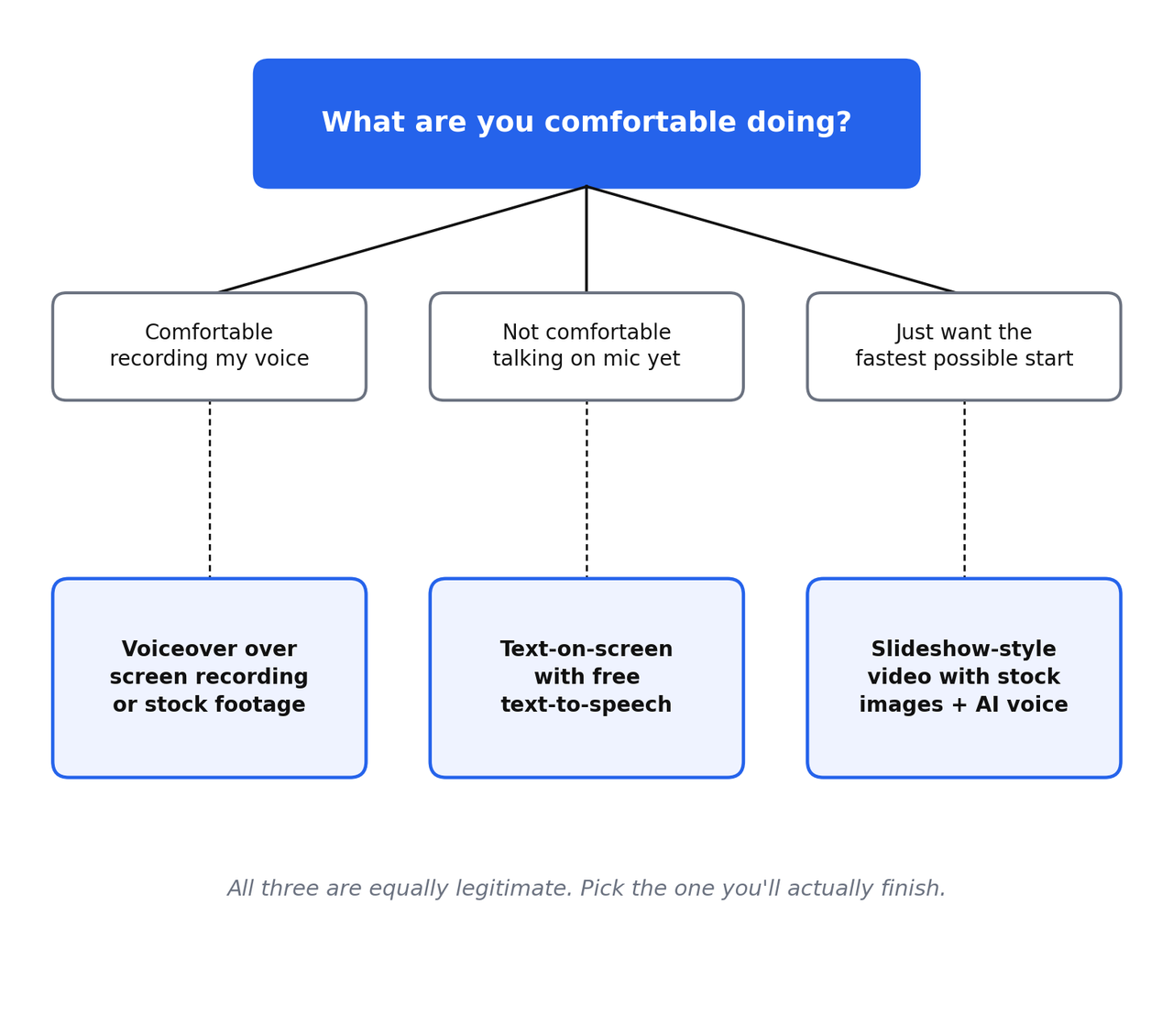
There isn't one correct faceless format, and picking the one that matches what you're actually willing to do matters more than picking the "best" one. If you're comfortable recording your own voice, narrating over screen recordings or stock footage is a straightforward starting point, your voice adds a layer of authenticity that's genuinely useful even without your face. If talking into a microphone feels uncomfortable right now, a text-on-screen format paired with free text-to-speech narration removes that barrier entirely. If you just want the fastest possible path to a published video, a slideshow-style format using stock images and an AI voice tool can go from script to finished video in under an hour.
All three are legitimate, working formats. The one that actually gets you to publish something is the right one to start with.
Step Four: The Zero-Budget Beginner Tool Stack
| Task | Free Tool |
|---|---|
| Video editing | CapCut (free desktop and mobile versions) |
| Thumbnails | Canva free plan |
| Stock footage and images | Pexels and Pixabay, both free with no attribution required for most uses |
| Voice narration | Your own recorded voice, or a free tier text-to-speech tool if you'd rather not record yourself yet |
| Keyword research | YouTube's own search bar autocomplete, and YouTube Studio's Research tab once you have a channel history |
This stack costs nothing and is genuinely capable of producing a complete, watchable first video. Once you've published a handful of videos and have a sense of what's working, upgrading to paid tools for speed makes sense, I've covered the paid options worth considering at that stage in the automation tools actually worth paying for. Don't start there. Start with the free stack until you've proven the model works for you specifically.
Step Five: Script And Produce Your First Video
Pick one specific, narrow problem from your topic, not a broad overview of the whole subject. Write a short script that opens by stating exactly what the video answers, delivers that answer as directly as possible without padding, and doesn't waste the first thirty seconds on an introduction nobody asked for. Record your narration, or generate it, then assemble your footage or images around it in CapCut, matching visuals to what's being said without needing anything elaborate. A clean, simple video that fully answers one specific question will outperform a polished video that wanders.
Step Six: Publish It Correctly
Don't rush the upload screen after putting real effort into the video itself. Title it clearly around the specific problem it solves, choose a thumbnail with one clear focal point, and fill in the description with real, useful sentences rather than a handful of keywords. If you want the full pre-publish process laid out step by step, I've broken that down completely in the only YouTube SEO checklist you need before you hit publish.
The Most Common Mistakes True Beginners Make
Re-recording the same video over and over chasing a perfection that doesn't actually move the needle, a decent video published beats a perfect video still sitting unfinished on your desktop. Picking a topic with no real search demand behind it because it seemed interesting rather than checking whether people are actually searching for it. Buying expensive software or gear before publishing a single video, when the free stack is genuinely sufficient to find out whether this model works for you. And quitting somewhere in the first two months, right around the point where a channel built correctly is just barely starting to show its first real signals.
A Realistic First 30 Days
- Days 1-3: Set up your channel, pick your topic, and list ten to fifteen specific problems within it.
- Days 4-7: Choose your format, install your free tools, and script your first video.
- Week 2: Produce and publish your first video using the checklist above. Don't judge it yet.
- Weeks 3-4: Publish two to three more videos, each aimed at a different specific problem from your list, and start paying attention to which ones show any early signal at all.
Frequently Asked Questions
Do I need to show my face at any point on a faceless channel?
No. Plenty of fully faceless channels build real, sustainable income entirely through voiceover, text-on-screen, or AI-narrated formats without ever showing a face.
What's the cheapest way to start with genuinely zero budget?
CapCut for editing, Canva for thumbnails, Pexels or Pixabay for footage, and either your own recorded voice or a free-tier text-to-speech tool. This entire stack costs nothing to start.
How long before a faceless channel with zero experience starts getting real traction?
Typically the first two to three months show very little, with real signals more commonly appearing between months three and six for channels built around specific, evergreen topics. This varies by niche and consistency.
Is it too late to start a faceless YouTube channel in 2026?
No, though the generic, templated version of faceless content is genuinely crowded. A channel built around specific, well-researched problems rather than broad trending topics isn't competing in that same crowded space.
What I'd Actually Do This Week
Set up the channel, pick your topic, and publish one video by the end of the week, even an imperfect one made entirely with free tools. The gap between people who eventually build something real and people who don't usually comes down to whether they published something while they were still figuring it out, or waited until they felt ready and never actually started.
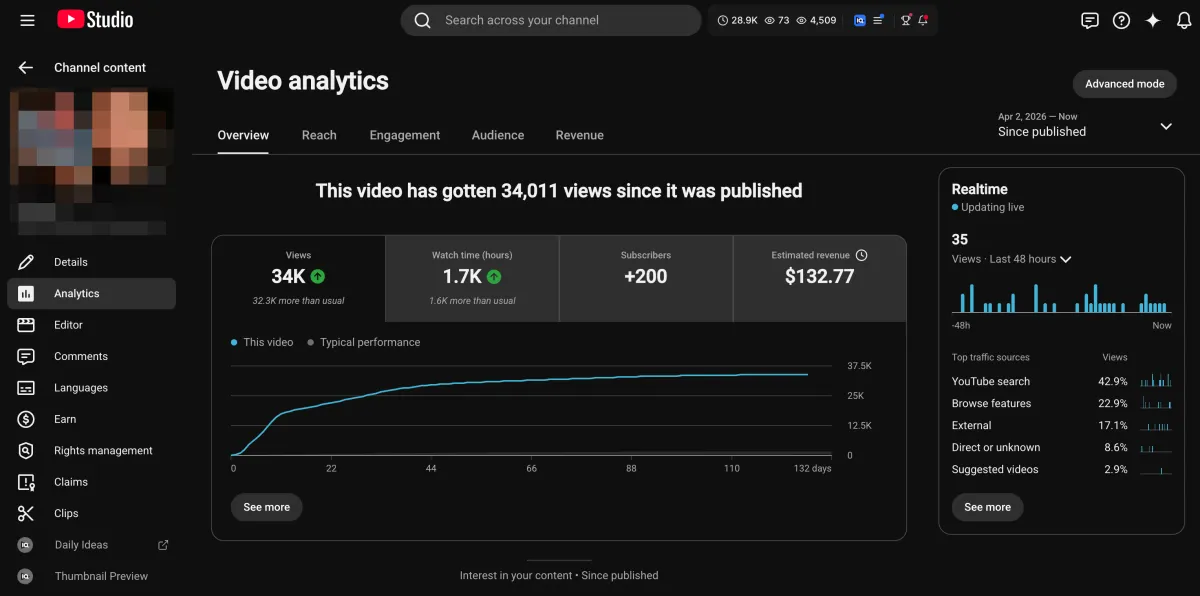
Learn how I turned a $132.77 video into $1000+ per month asset
Full case study on how you can replicate my success with YouTube SEO strategy.
Free downloadThe Zero Audience System
Build permanent YouTube income without a camera or an audience
The full methodology, 31 lessons plus bonuses. Limited spots.