The best free YouTube SEO analyzer isn't the tool that gives your video a checklist score out of 100. It's the one that tells you whether a video is still actually earning search traffic right now, months or years after it was published. The free vidIQ browser extension does exactly that, and it does it through two specific numbers most people scroll straight past: views per hour, and the shape of a video's view history over time. Here's exactly how to use both, on your competitors' videos and on your own.
Why Most "SEO Analyzer" Advice Misses The Actual Point
A lot of tools, free and paid, will hand you an SEO score based on whether your title contains a keyword, your description is long enough, and your tags are filled in. That's useful for catching obvious mistakes before you publish. It tells you nothing about whether a video is actually working after it's live. A perfectly optimized title on a video nobody's finding is still a failure. The more useful question isn't "is this video optimized," it's "is this video still being found," and that's a completely different check.
The Tool: vidIQ's Free Browser Extension
vidIQ Vision for YouTube, the free Chrome, Firefox, and Edge extension, overlays real data directly onto YouTube while you browse: an SEO checklist, views per hour, and competitor tracking with up to three competitor channels on the free plan. The extension is the part almost everyone starts with, and for this specific method, it's the only part you need.
Method One: Checking Whether A Competitor's Video Is Still Actually Relevant
Open a competitor's channel and sort their videos by most popular. Click into their top-performing videos one at a time. With the vidIQ extension installed, you'll see a Views Per Hour (VPH) number displayed under the video, along with its view history.
Two things determine whether that video is genuinely still relevant, not just historically popular:
- VPH above roughly 50. This means the video is still actively accumulating views at a meaningful rate, not just sitting on old view count from months or years ago.
- A linear view pattern from the start, rather than a sharp early spike that flattens out. This is the part that actually tells you why the video still has momentum.
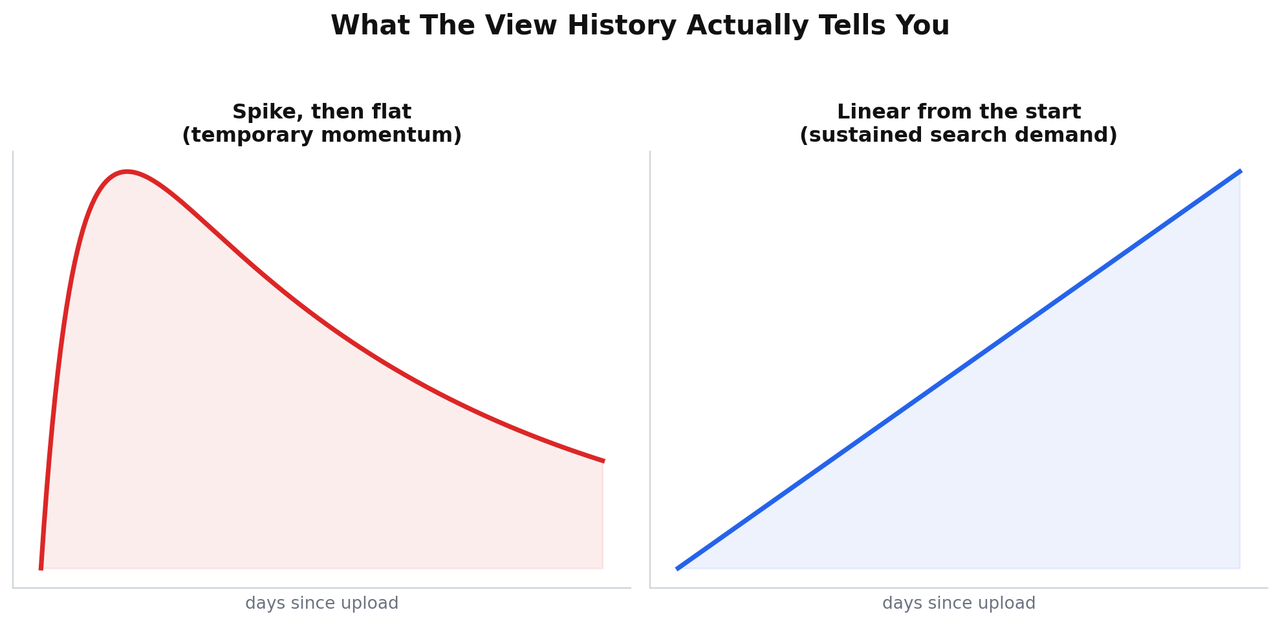
A video with a sharp early spike that's since flattened out got its views from being recommended or trending once. That demand already happened and isn't coming back the same way. A video with a steady, close-to-linear climb since the day it was published is being found through ongoing search demand, the same mechanism that made it popular in month one is still bringing it viewers in month twelve. If both signals are present, high current VPH and a linear history, that's a genuinely evergreen, still-in-demand topic worth building your own version of. If the VPH is high but the history shows a spike that's fading, you're looking at a topic that already had its moment.
One Honest Caveat On The 50 VPH Threshold
Treat 50 as a reasonable starting benchmark, not a fixed rule. VPH is relative to channel size and niche, a channel with a million subscribers might see 50 or more VPH as unremarkable baseline performance, while the same number on a small, specific-niche channel is a genuinely strong signal. Compare a video's VPH against other videos in the same niche and similar channel size, not against an arbitrary universal number.
Method Two: Running The Same Check On Your Own Channel
The same two signals apply to your own videos, with one advantage: you don't need to guess at traffic source, YouTube Studio's own Analytics tells you directly. Open a video's Analytics tab and check the traffic source breakdown. A video where YouTube Search makes up a large share of views, combined with a VPH that's still meaningfully above zero months after publishing, is your own evergreen winner. Cross-reference that against which of your videos vidIQ shows a linear view history for, and you'll have a short, honest list of exactly which of your own videos are genuinely still working through search, not just videos you personally liked making.
A Simple Way To Use Both Signals Together
| VPH | View history shape | What it means |
|---|---|---|
| High (50+, relative to niche) | Linear from the start | Genuinely evergreen, still in demand, worth recreating or building more content around |
| High (50+, relative to niche) | Spike that's flattened | Rode a temporary wave, the demand that drove it may not repeat |
| Low | Linear from the start | Real but small search demand, a legitimate niche topic, just a smaller one |
| Low | Spike that's flattened | Already faded, low current relevance |
Why This Beats A Static SEO Score
A checklist-style SEO score is a pre-publish tool, it helps you avoid an obvious mistake before you hit upload. VPH combined with view history is a post-publish, ongoing tool, it tells you what's actually happening in the market right now, for your content and your competitors' content alike. Both have a place. Only one of them tells you whether a topic is still worth your time today. If you want the pre-publish checklist covered in full, I've broken that down separately in the only YouTube SEO checklist you need before you hit publish.
Frequently Asked Questions
Is vidIQ's VPH feature actually free?
Yes, Views Per Hour is shown in the free vidIQ browser extension under videos as you browse YouTube, no paid plan required to see it.
What counts as a "good" VPH number?
There's no universal number, it depends on the channel's size and niche. Around 50 is a reasonable starting benchmark for a smaller or mid-sized niche channel, but always compare against similar channels rather than treating it as an absolute threshold.
Can I check my own videos this way, or only competitors?
Both. The extension shows VPH and view history on any video you view, including your own, and pairing that with your own YouTube Studio Analytics traffic source data gives an even clearer picture for your own content specifically.
Why does a linear view pattern matter more than total views?
Total views tell you what happened in the past. A linear pattern tells you the video is still being actively found right now through the same mechanism, generally search, that built its views in the first place, which is a much stronger signal for whether the topic is still worth pursuing today.
The Actual Takeaway
Don't judge a competitor's video, or your own, by its total view count alone. Check the VPH, then check whether that number reflects a video still climbing steadily or one that already had its moment and is fading. That combination is the real free YouTube SEO analysis, and it takes about thirty seconds per video once the extension is installed.
For the vidIQ team's own explanation of VPH and how it's calculated, see their official Views Per Hour help article. For the deeper mechanics of why search-driven, evergreen content behaves this way in the first place, I've covered that in what actually determines YouTube ranking factors.
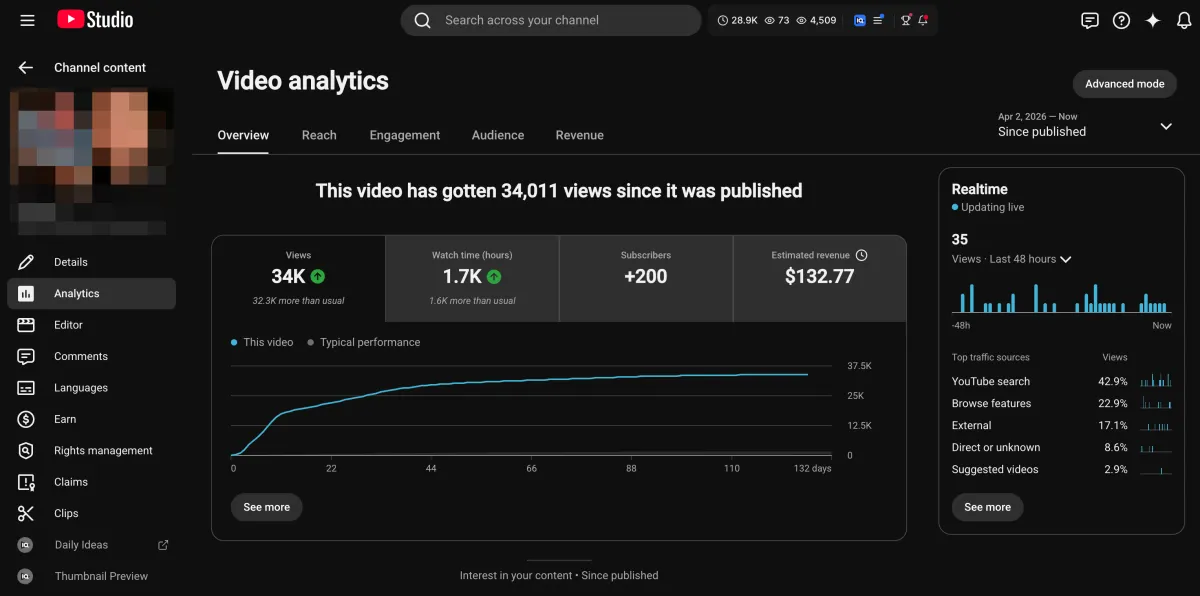
Learn how I turned a $132.77 video into $1000+ per month asset
Full case study on how you can replicate my success with YouTube SEO strategy.
Free downloadThe Zero Audience System
Build permanent YouTube income without a camera or an audience
The full methodology, 31 lessons plus bonuses. Limited spots.