You do not need to show your face to build a real YouTube channel. You also do not need a studio, a camera, or the kind of personality that performs for the camera. What you need is a format that matches the topic, a way to deliver information that is easier to watch than it is to read, and the discipline to keep publishing.
This list is not a collection of random niches. It is organized by the actual format the channel uses, because the format determines what tools you need, how long production takes, and how easy it is to stay anonymous. Some of these are beginner friendly. Some require more skill or budget. All of them can work without your face on screen.
If you want a bigger list, 100 faceless YouTube channel ideas goes deeper into underrated angles. If you want niches organized by market opportunity, 200 YouTube automation niches for 2026 is the better read.
1. Screen recorded software tutorials
Record your screen while you walk through a tool people use. Add a clean voiceover. This is the classic faceless format and it works because the viewer came to learn something specific.
Examples: Notion tutorials, Photoshop workflows, Excel formulas, CRM setup.
2. Walkthroughs of websites and apps
Similar to software tutorials, but focused on web apps. Show people how to use a specific feature, compare pricing pages, or set up integrations.
Examples: Shopify setup, Figma basics, Zapier automations, email marketing tools.
3. Coding tutorials and project builds
Screen recording plus code. One of the highest intent audiences on YouTube. Viewers will rewatch, pause, and follow along.
Examples: Python projects, web development builds, API integrations, no code tools.
4. Data analysis and spreadsheet tutorials
Teach people how to use data. Excel, Google Sheets, Power BI, Tableau. The audience is often professional and the content ages well.
Examples: Dashboard builds, financial models, pivot table guides, automation with formulas.
5. AI tool demos and comparisons
Show what generative AI tools can actually do. Compare outputs, walk through prompts, and explain limitations honestly.
Examples: ChatGPT prompts, image generator comparisons, AI video tools, workflow automations.
6. Stock footage with AI voiceover
Build narratives using stock video clips and an AI or hired voice. Great for history, science, business stories, and explainer content.
Examples: Historical events, business case studies, science explainers, biography channels.
7. Documentary style deep dives
Long form storytelling using archival footage, images, and voiceover. Requires strong research and scriptwriting, but the retention can be excellent.
Examples: True crime summaries, company breakdowns, military history, unsolved mysteries.
8. List and ranking videos
Curated lists with visuals. The format is simple, repeatable, and highly clickable. The challenge is making the list actually useful rather than generic.
Examples: Best tools, worst products, richest people, biggest failures, underrated apps.
9. Compilation channels with commentary
Collect clips around a theme and add original commentary. Riskier because of reused content rules, but possible if the commentary is substantial.
Examples: Sports analysis, movie scene breakdowns, internet culture commentary.
10. Reddit story readings
Read interesting threads with gameplay or stock footage in the background. Popular, but saturated. The winners add real commentary rather than just reading.
Examples: Relationship advice, work stories, creepy encounters, moral dilemmas.
11. Whiteboard animation explainers
Use tools like Doodly or VideoScribe to create hand drawn style animations. Works well for concepts, processes, and step by step guides.
Examples: Psychology concepts, business models, productivity systems, philosophy basics.
12. Motion graphic explainers
Higher production value than whiteboard, but more flexible. Use After Effects or simpler tools to animate concepts.
Examples: Economics, technology, science, product breakdowns.
13. Animated storytelling
Tell stories through animation. This can be simple character animation or abstract visual storytelling. Harder to produce but very defensible.
Examples: Personal finance parables, historical events, fictional shorts.
14. Music channels and ambient mixes
Upload original music, ambient soundscapes, or curated playlists with a static visual. Low RPM but can build massive watch time.
Examples: Lo fi beats, rain sounds, focus music, sleep playlists.
15. Podcast style audio with a visualizer
Record audio content and pair it with a waveform visualizer or simple image. Works for interviews, solo commentary, and deep discussions.
Examples: Business interviews, niche commentary, book summaries, industry analysis.
16. News and commentary without a host
Summarize industry news using clips, screenshots, and voiceover. The key is speed and angle. You need to publish while the topic is still relevant.
Examples: Tech news, finance news, gaming news, creator economy updates.
17. Product review and comparison channels
Review products using footage from manufacturers, unboxing clips, and screen recordings. Add honest opinions and affiliate links where allowed.
Examples: Software reviews, camera gear, kitchen tools, budget tech.
18. Book summary and breakdown channels
Summarize nonfiction books into actionable takeaways. The audience is highly motivated and the content is evergreen.
Examples: Business books, psychology books, productivity classics, investing books.
19. Language learning lessons
Teach vocabulary, grammar, and pronunciation using text on screen and audio. No face required. The audience is global and loyal.
Examples: Spanish for beginners, English phrases, Japanese basics, pronunciation drills.
20. Finance and investing explainers
Explain financial concepts, stock analysis, or economic trends using charts and voiceover. One of the highest RPM niches.
Examples: Stock breakdowns, ETF guides, personal finance basics, economic news.
21. Real estate market updates
Analyze local or national real estate trends using data visuals and maps. Works well with a local angle.
Examples: City market reports, mortgage rate updates, investment property analysis.
22. Travel guides with stock footage
Create destination guides using stock footage, maps, and practical information. The faceless version of a travel vlog.
Examples: City itineraries, budget travel guides, moving abroad guides, hidden gems.
23. Cooking tutorials with overhead shots
Film your hands and the food. No face needed. The audience wants the recipe, not a personality.
Examples: Meal prep, budget recipes, cuisine deep dives, technique tutorials.
24. DIY and craft tutorials
Show the process from a first person angle. Hands and materials do the talking.
Examples: Woodworking, home repairs, paper crafts, electronics projects.
25. Fitness and workout channels
Demonstrate exercises, routines, and programs without speaking to the camera directly. Voiceover or on screen text works fine.
Examples: Home workouts, stretching routines, form guides, program reviews.
How to choose the right one
The best faceless channel idea is not the one with the highest RPM or the biggest audience. It is the one you can produce consistently without burning out.
Ask yourself three questions.
- Can I research or script this without hating it?
- Can I make the first 50 videos without buying expensive gear?
- Is there a clear way this content earns money beyond ad revenue?
If the answer is yes to all three, you have a real candidate. If you are unsure about the money side, my post on how much faceless YouTube channels make breaks down the economics honestly.
What you actually need to start
Most faceless channels need less than people think. A decent microphone or AI voice tool, a screen recorder or stock footage source, a simple editing program, and a way to write scripts that sound like a person rather than a textbook.
You do not need a camera. You do not need to be charismatic. You do not need to go viral. You need a system that lets you publish useful videos on a schedule.
For the research and optimization side, the free YouTube tools I actually use cover what I rely on.
The formats to avoid when you are starting
Some faceless formats are harder than they look.
Compilation channels with no commentary are getting demonetized or suppressed for reused content.
Channels that just read Wikipedia articles rarely hold attention and struggle to stand out.
Fake voice over reaction channels feel cheap and burn trust fast.
Channels that depend entirely on trending topics require constant production and rarely build a library that pays you while you sleep.
The formats that last are the ones where the value is in the information, the structure, or the research, not in being first to repost a clip.
Frequently Asked Questions
Do faceless channels make less money?
Not inherently. RPM depends on niche and audience, not whether you show your face. A faceless finance channel can earn far more than a personality vlog in a low intent niche.
Can I stay completely anonymous?
Yes. You can use a pseudonym, AI voice, stock footage, and never appear on camera. Just make sure your content is accurate and your monetization setup is legitimate.
What is the easiest faceless format to start?
Screen recorded tutorials are usually the easiest entry point. The tools are free or cheap, the audience intent is high, and you do not need to learn animation or voice acting.
Do I need to use AI voice?
No. You can record your own voice without showing your face. Many successful faceless channels use a real narrator. AI voice is an option, not a requirement.
How long until a faceless channel monetizes?
Most channels need 500 subscribers and 3,000 watch hours, or 3,000,000 Shorts views in 90 days, plus a review. Realistically, expect six to twelve months of consistent uploads before you see meaningful income.
The Bottom Line
There are more ways to build a YouTube channel without showing your face than most people realize. The trick is not to copy the most popular format. The trick is to find a format that fits a topic people actively search for, that you can produce without burning out, and that has a clear path to income.
Pick one idea from this list. Make the first video this week. The channel you want is built one upload at a time, not by planning forever.
If you want the full system behind building these channels as permanent income assets, [the Zero Audience System course](/) is where I teach the entire process from research to monetization.
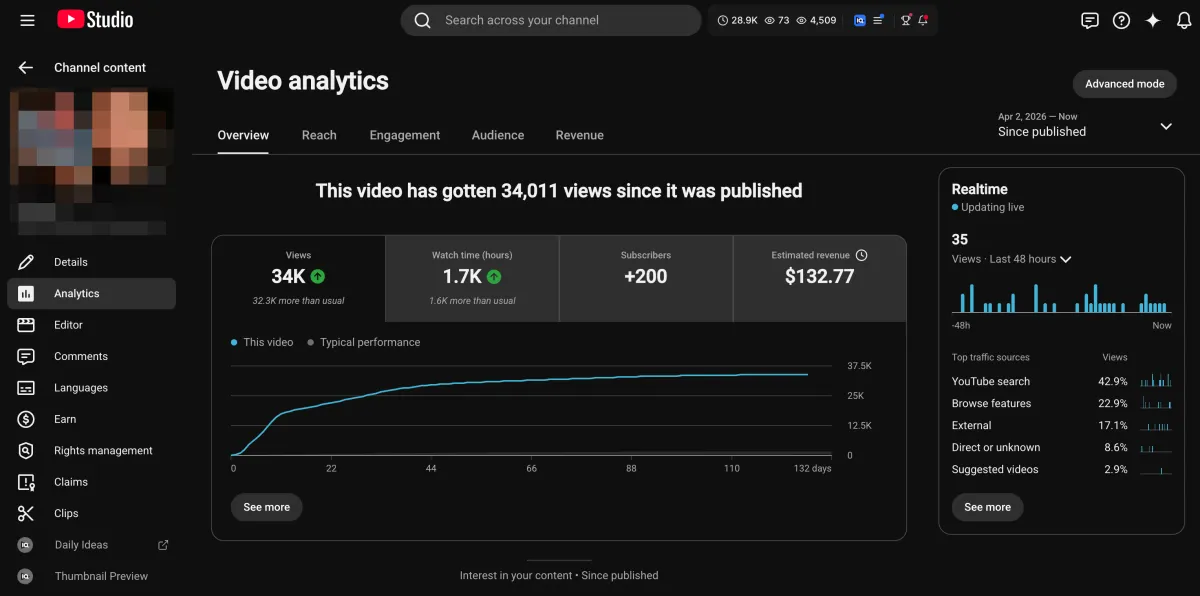
Learn how I turned a $132.77 video into $1000+ per month asset
Full case study on how you can replicate my success with YouTube SEO strategy.
Free downloadThe Zero Audience System
Build permanent YouTube income without a camera or an audience
The full methodology, 31 lessons plus bonuses. Limited spots.