I have paid for almost every YouTube tool on the market at some point. Some were worth it. Most were a dashboard wrapped around data I could have got for free in ten minutes. If you are starting out, you do not have a tool problem, you have a decision problem, and free tools answer the decisions that matter.
So this is the honest version. Twelve free tools, what each one is actually good at, where each one lies to you, and the order I use them in before a single video gets made.
What A Tool Is Even For
A tool has four jobs and no more. Find demand. Size demand. Judge competition. Track results. Everything else in these dashboards is decoration you are paying a monthly fee to look at.

If a tool does not move you closer to one of those four answers, close it. I have watched people spend three weeks in a keyword dashboard and publish nothing.
1. YouTube Autocomplete
Free. No account. The most accurate demand data that exists, and the one almost everybody skips because it does not look like a tool.
Open YouTube in a private window, type your subject, add a space, and read the suggestions. Then repeat with your subject plus each letter, a through z. You will end up with sixty to two hundred real queries pulled from YouTube's own logs.
Good at. Telling you the exact phrasing people use, which is usually not the phrasing you would have guessed. Lies about. Nothing, but it gives you no volume numbers. Use it for discovery, size elsewhere. How I use it. First step, always. This produces the raw list everything else filters.
2. YouTube Studio Research Tab
Free with a channel. Under Analytics, Research. This shows what your own viewers searched and, more usefully, a search volume indicator for any query you type, plus a flag when a query has high demand and low supply of content.
Good at. The "content gap" flag. When it tells you demand is high and few videos cover it, that is the single best free signal on the platform. Lies about. Volume is a relative bar, not a number. Do not treat it as absolute. How I use it. Second step. I run my autocomplete list through it and keep anything flagged as underserved.
3. Google Trends
Free. The only tool here that answers the question that actually decides whether a video is an asset. Is this topic permanent or is it a spike.
Set the range to five years, not twelve months. A flat or slowly rising line is what you want. A single mountain is a topic that already happened.
Good at. Separating durable topics from dead ones, and comparing up to five topics side by side. Lies about. Relative interest is not volume. A flat line at "12" can still be plenty of searches. How I use it. Every query that survives step two gets a five year check. Anything spiky gets deleted from the list.
4. Google Keyword Planner
Free with a Google Ads account, and you do not need to run a single ad. Sign up, choose expert mode, skip campaign creation, and the planner is yours.
Good at. Real monthly volume ranges and, more importantly, cost per click. CPC is the closest free proxy for how much a topic's audience is worth, which is what decides your RPM later. Lies about. Volumes come in broad buckets unless you spend, and it is Google data, not YouTube data. How I use it. I care less about volume here and more about CPC. High CPC topics are the ones where a channel earns ten times more per view, as I broke down in how much do faceless YouTube channels make.
5. Google Search Console
Free once you have a website or a page embedding your videos. Not a YouTube tool as such, but if any of your videos are embedded anywhere you own, this shows the queries pulling them.
Good at. Real query data with impressions and position, which no YouTube tool gives you. Lies about. Nothing, but it only covers what you own. How I use it. Once a channel has a simple site behind it, this becomes the honest scoreboard.
6. VidIQ Free Plan
Free browser extension. Shows a score on every video and query, competition estimates, and the tags a video used.
Good at. Speed. Typing a query and seeing an instant competition read is genuinely useful when you are screening forty ideas. Lies about. The score. It is a blended number and it rewards popular queries where you have no chance. Also the tag data, which is nearly worthless in 2026. How I use it. As a rough first filter only. I never let a score override what the actual results page tells me.
7. TubeBuddy Free Plan
Free extension. Similar territory to VidIQ with a better bulk processing set and a genuinely good A/B testing feature on the paid tier.
Good at. Housekeeping. Bulk description updates, end screen templates, checklists before publish. Lies about. Same problem, a single opportunity score compressing five different things into one number. How I use it. Publishing hygiene rather than research. I compared both against the paid options in the only YouTube automation tools worth paying for in 2026.
8. Ahrefs Free Keyword Generator
Free, no account, capped at a hundred ideas per query, and it has a dedicated YouTube mode.
Good at. Volume estimates for YouTube specifically, plus question variations, without paying for a full subscription. Lies about. Difficulty is not shown on the free tier, so you still have to read the results page yourself. How I use it. Cross checking the numbers I get from the planner, since one is Google data and one is YouTube data.
9. AnswerThePublic Free Searches
A small number of free queries a day. Produces a wheel of question phrasings around a seed.
Good at. Question formats. Who, what, when, why, can, should. Question videos are the easiest to rank because the intent is unambiguous. Lies about. It scrapes suggestions rather than measuring volume, so half the output is noise. How I use it. When my autocomplete list is thin and I need more angles on the same subject.
10. The Results Page Itself
Free, and better than every paid tool for the one question they all fail at. Can I beat what is already there.
Search your query in a private window and read the first eight results. Publish dates, channel sizes, view counts, whether they actually answer the question, and how similar the thumbnails are. I explained the full checklist in the full YouTube SEO guide for 2026.
Good at. Everything that matters. Every tool's difficulty score is a guess at what you can see directly here. Lies about. Nothing, as long as you are logged out. Logged in results are personalised and useless for this. How I use it. Final gate. No video gets made until it passes this.
11. YouTube Studio Analytics
Free. Specifically the Reach tab, traffic source types, and the search terms report.
Good at. Telling you which queries are already finding you, including ones you never targeted. That list is your next content calendar and it costs nothing. Lies about. Nothing, but people read the wrong report. Total views is vanity. Share of views from search is the health metric. How I use it. Every Monday. Ten minutes. It has produced more video ideas than any research tool I have paid for.
12. A Spreadsheet
Not a joke. Columns for query, volume, five year trend, top result age, top channel size, verdict, status. Thirty rows of that beats any dashboard, because it forces a decision on each row instead of endless browsing.
The Free Stack In Order
Here is the whole workflow. It takes about ninety minutes and validates two months of uploads.
- Autocomplete on YouTube and Google. Build a raw list of a hundred queries.
- Studio Research tab. Keep the ones flagged as underserved.
- Google Trends, five year view. Delete anything spiky.
- Keyword Planner. Note volume and CPC. Prioritise high CPC.
- Results page check on the survivors. Keep anything where the top results are old, small, or off target.
- Spreadsheet. Rank by easiest first, not biggest first.
- Publish. Then read Studio search terms weekly and feed new queries back to step one.
That is it. No subscription in the chain.
What Free Tools Cannot Do
I would rather be straight about the ceiling than pretend it does not exist.
- They cannot see historical rankings. You cannot tell whether the number one result has held that position for two years or two weeks.
- They cannot bulk process. Checking four hundred queries by hand is a day of work. Paid tools do it in a minute.
- They cannot track your position over time. You will feel progress rather than measure it, which is fine at the start and painful at scale.
- They cannot tell you what a competitor's whole library earns. That is the one genuinely valuable thing worth paying for later.
None of those matter for your first thirty videos. All of them matter at video three hundred. Pay when the bottleneck is real, not before.
A tool tells you what exists. It does not tell you what to make. That decision is still yours and it is the one that decides the outcome.
The Mistakes I See Constantly
- Chasing green scores. A tool showing a green opportunity score on a query dominated by channels with two million subscribers is a tool being optimistic on your behalf.
- Sizing before discovering. People start with volume filters and end up with the same list everyone else has. Start with phrasing, then size.
- Ignoring CPC. Two queries with identical volume can be worth fifteen times different amounts. This is the most underused free number in the entire stack.
- Using tools instead of publishing. Research is comfortable and publishing is not. Ninety minutes of research should produce two months of uploads, not two more weeks of research.
- Trusting tag scrapers. Tags carry almost no weight now. A tool selling you competitor tags is selling you 2016.
If you want a quick read on your own channel's numbers rather than a competitor's, the engagement rate calculator and sponsorship calculator here do it in a few seconds.
The Short Version
You can validate an entire year of content with autocomplete, the Studio Research tab, Google Trends, Keyword Planner, and a spreadsheet. Five free things. The paid tools save you time once you are publishing at volume, and they save you nothing at all before that.
The tools were never the hard part. Picking topics that will still be searched in three years, and then actually publishing them, is the hard part. That is the process I lay out end to end in [the Zero Audience System](/).
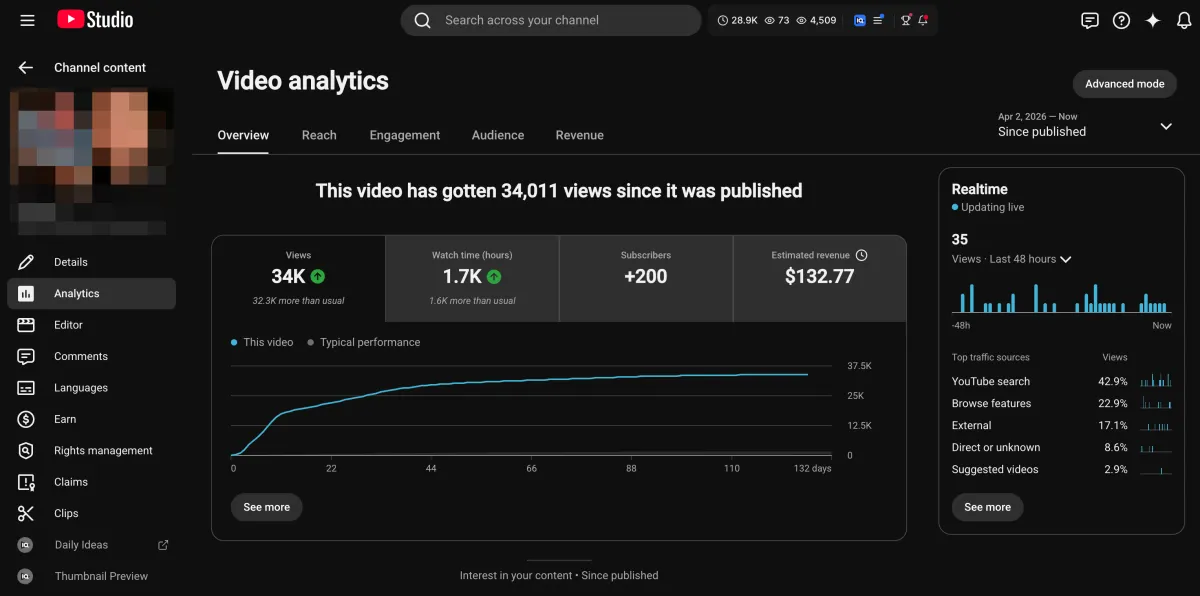
Learn how I turned a $132.77 video into $1000+ per month asset
Full case study on how you can replicate my success with YouTube SEO strategy.
Free downloadThe Zero Audience System
Build permanent YouTube income without a camera or an audience
The full methodology, 31 lessons plus bonuses. Limited spots.