Most "best AI tools for YouTube automation" lists run 15 to 20 entries deep, and half of them are barely used by anyone actually running a channel. The honest version is a lot shorter: one solid tool per production stage, chosen because it's genuinely good at that specific job, not because it showed up on a sponsored roundup. Here's that list, organized by what each tool actually does in a real workflow, not by hype.
If you're still deciding whether this whole model makes sense for you, start with what YouTube automation actually is and come back to the tooling after.
The Honest Stack: One Tool Per Stage
| Stage | Tool | What it actually does | Starting price |
|---|---|---|---|
| Scripting | ChatGPT or Claude | Idea development, outlines, full scripts | Free tier, paid plans around $20/month |
| Voice | ElevenLabs | High-quality AI narration, voice cloning | Free tier, paid plans from around $5 to $22/month |
| Full faceless video production | Fliki | Script to finished video, 2,000+ voices, direct YouTube publishing | From $14/month billed annually |
| Faceless production with visual consistency | TubeGen AI | Scriptwriting, voiceover, thumbnails, and a consistent character or art style across videos | Paid plans, check current pricing |
| Editing and cleanup | Descript | Edit video by editing the transcript, remove filler words automatically | From around $12 to $24/month |
| Shorts repurposing | Opus Clip | Turns long-form videos into clipped, captioned Shorts | Free plan available, paid from around $9/month |
| Thumbnails | Canva | Fast thumbnail design with AI assist | Free tier, Pro around $13/month |
| Topic and competitor research | VidIQ | Demand data, competitor tracking, title and tag scoring | Free tier, paid plans vary |
That's the real stack. Everything past this list is either a nice-to-have or something better suited to a specific niche, not a general recommendation.
Why I'd Skip The 20-Tool "Ultimate Stack" Lists
A lot of the roundups on this topic exist to fill sponsor slots, not to actually help someone run a channel. The tell is usually the same: a tool for every conceivable micro-task, competing tools listed side by side with no actual recommendation between them, and vague feature descriptions copied from the tool's own marketing page. The problem with subscribing to eight or nine overlapping tools isn't just the cost. It's the cognitive overhead of maintaining that many accounts, remembering which one does what, and re-learning interfaces every time you switch between stages. One solid tool per stage, used consistently, beats a sprawling stack you half-use.
Scripting: ChatGPT vs. Claude
Both work. The practical difference shows up on longer scripts. ChatGPT is faster to iterate with for short-form ideas, titles, and quick outlines. Claude tends to hold a consistent tone across a longer document without drifting into repetitive sentence patterns, which matters more on a 1,500-word script that a voice tool is going to read verbatim.
Use ChatGPT if your priority is speed and short-form iteration. Use Claude if your priority is a longer, more natural-sounding script that doesn't need heavy editing afterward. Either one beats writing from a blank page, and neither one is a reason to pay for both.
Voice And Full Video Production: Picking Between Fliki, TubeGen AI, And ElevenLabs
This is where the actual decision-making matters, because these three tools solve overlapping but different problems.
ElevenLabs is a voice tool, not a video tool. If you're assembling video separately, in Descript or a traditional editor, and just need the best raw narration quality, this is the one to use. It doesn't touch visuals, thumbnails, or publishing.
Fliki is a full script-to-video platform: over 2,000 AI voices across 80-plus languages, voice cloning, AI avatars, stock visuals, captions, and it can publish directly to a connected YouTube channel with the title, description, and tags filled in inside the same workflow. It's built for speed, going from an idea or a script to a publish-ready video without leaving one tool.
TubeGen AI is built more specifically around faceless channel identity. Beyond scripting and voiceover, it focuses on keeping a consistent visual style, character look, or art direction across every video on a channel, which matters if you want your channel to feel like one coherent thing rather than a series of disconnected AI-generated clips.
If you want the fastest path from idea to a publishable video with the broadest voice and language selection, Fliki is the stronger pick. If visual consistency across your whole catalogue matters more to you than raw speed, TubeGen AI is worth the look instead. If you're not doing full AI-generated visuals at all and just need the best-sounding narration for footage you're assembling yourself, skip both and go straight to ElevenLabs.
Editing: Descript
Descript's core idea is simple and genuinely useful: your video's transcript becomes the editing timeline. Delete a sentence in the text, the corresponding video cut happens automatically. For anyone producing long-form content on a regular schedule, this removes the slowest part of traditional editing, scrubbing through a timeline looking for the exact cut point.
It's not a replacement for a traditional editor if you need complex layered effects or cinematic transitions. For straightforward talking-point or narrated content, which covers most automated channels, it's faster than a timeline-based editor for the specific job of cutting a clean video from a rough recording or generated draft.
Shorts: Opus Clip
If you're publishing long-form content and not repurposing any of it into Shorts, you're leaving a distribution channel on the table for free. Opus Clip scans a long video, identifies the moments most likely to work as a standalone short clip, and exports them captioned and formatted vertically. This isn't a "nice extra," it's close to a default step in a 2026 workflow if you're already producing long-form video anyway.
Thumbnails And Research: Canva And VidIQ
Canva remains the fastest way to produce a clean, effective thumbnail without hiring a designer, especially with its AI-assisted layout and background tools. It's not the most powerful design tool available, but it's more than good enough for the job, and speed matters more than polish here.
VidIQ handles the demand and competitive research side, showing how much interest a topic has, related topics worth covering, and how a specific title or tag set is likely to perform relative to similar content. Pair it with your scripting tool rather than treating it as a separate research phase, decide your target topic before you write the script, not after. If you want the fuller picture on what actually moves a channel, the ranking factors breakdown covers the parts no tool can do for you.
The Tools I Wouldn't Pay For Yet
There's a growing category of "fully autonomous AI agent" platforms promising to handle an entire channel, research, scripting, voice, editing, thumbnails, and publishing, without a human touching any step. I'd treat these carefully.
The problem isn't the technology. It's that removing human review entirely is exactly the pattern that gets flagged under YouTube's current content policy around mass-produced, templated content. A tool that can technically run unattended doesn't mean it should. Every stage in the stack above still benefits from someone actually looking at the output before it goes out. Paying extra for a platform whose main selling point is "you don't have to look at any of it" is paying for the one feature most likely to hurt you. That same "hands off" promise is the thing Reddit argues about most, and mostly for good reason.
A Realistic Monthly Budget By Stage
| Setup | Rough monthly cost | What's included |
|---|---|---|
| Minimal solo stack | Around $40 to $60 | One scripting tool, one voice or full-video tool, Canva, a free-tier research tool |
| Full stack, one channel | Around $80 to $120 | Scripting, voice or full-video tool, Descript, Opus Clip, Canva Pro, VidIQ |
| Multi-channel operation | Scales with channel count | Same stack, higher tiers or seats, plus outsourced review time |
How I'd Build This If I Were Starting Today
- Start with one scripting tool and one voice or full-video tool. That combination alone covers the two most time-consuming stages.
- Add Canva for thumbnails immediately, it's free and takes minutes to learn.
- Hold off on Descript and Opus Clip until you have a small back catalogue of videos worth repurposing and cleaning up. There's no reason to pay for editing tools before you have something to edit.
- Add VidIQ once you're choosing between multiple video ideas and need real data to decide between them, not before you've published anything.
The mistake to avoid is buying the full stack in week one. Most of these tools solve a problem you won't actually have until you've published enough to know what your specific bottleneck is.
Frequently Asked Questions
Do I need a separate voice tool if I'm using Fliki or TubeGen AI?
No. Both include voice generation as part of the full production workflow. A standalone tool like ElevenLabs only makes sense if you're assembling video separately and want the widest voice selection or the highest narration quality specifically.
Is Descript worth it for a channel that isn't posting daily?
It's still useful, but the time savings are proportional to volume. A channel posting once a week will feel the benefit less than one posting several times a week, where the cumulative editing time adds up fast.
Can I run a full automated channel using only free tools?
To a point. Free tiers exist across most of this stack, but they usually come with watermarks, usage caps, or limited voice and export options. Free tools are fine for testing whether a channel concept works before you commit to paid plans.
Should I pick an all-in-one tool or a stack of specialized tools?
An all-in-one tool like Fliki or TubeGen AI reduces the number of handoffs between tools, which matters as you scale. A stack of specialized tools, ElevenLabs plus Descript plus a separate editor, gives more control at each stage but costs more setup time. Start with an all-in-one tool, and only break out into specialized tools once you know exactly which stage needs more control than the all-in-one version gives you.
Where I'd Actually Spend The First $50
If you're only going to pay for one thing before you've published a single video, spend it on whichever tool takes you from idea to a finished video the fastest, Fliki or TubeGen AI, not a dozen specialized tools you'll use for five minutes each. Everything else on this list earns its place once you know exactly where your own workflow is actually slow, and that's something you only find out by publishing, not by researching tools for another week.
Tooling is the easy part, and it's worth being honest that the tools are not what decides the outcome. Whether building this way is still worth it in 2026 comes down to what you point them at.
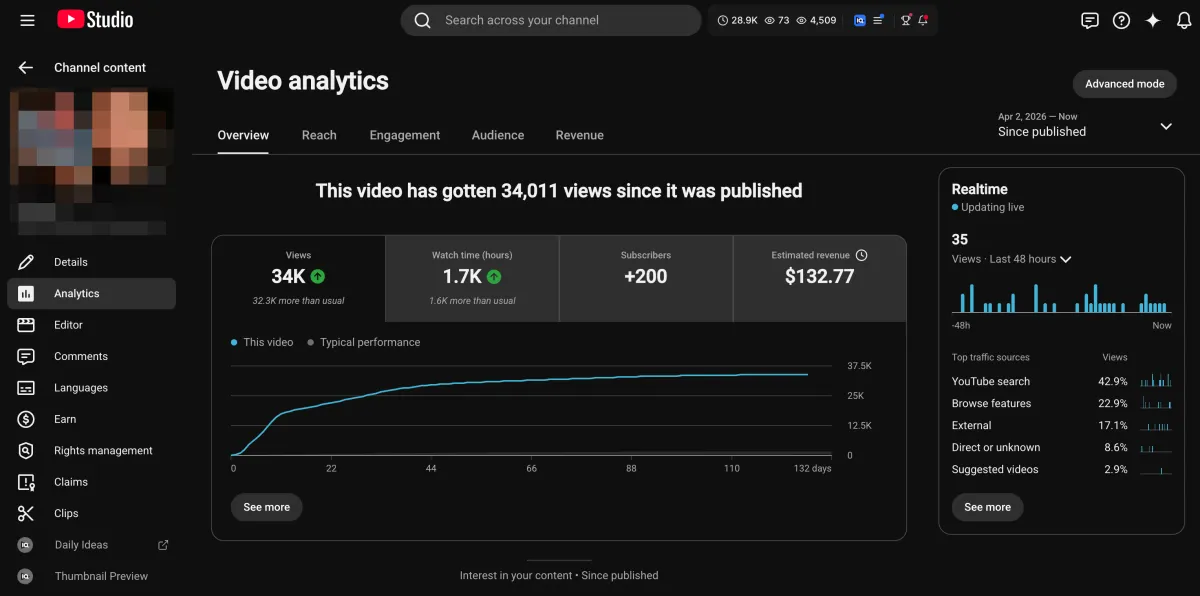
Learn how I turned a $132.77 video into $1000+ per month asset
Full case study on how you can replicate my success with YouTube SEO strategy.
Free downloadThe Zero Audience System
Build permanent YouTube income without a camera or an audience
The full methodology, 31 lessons plus bonuses. Limited spots.