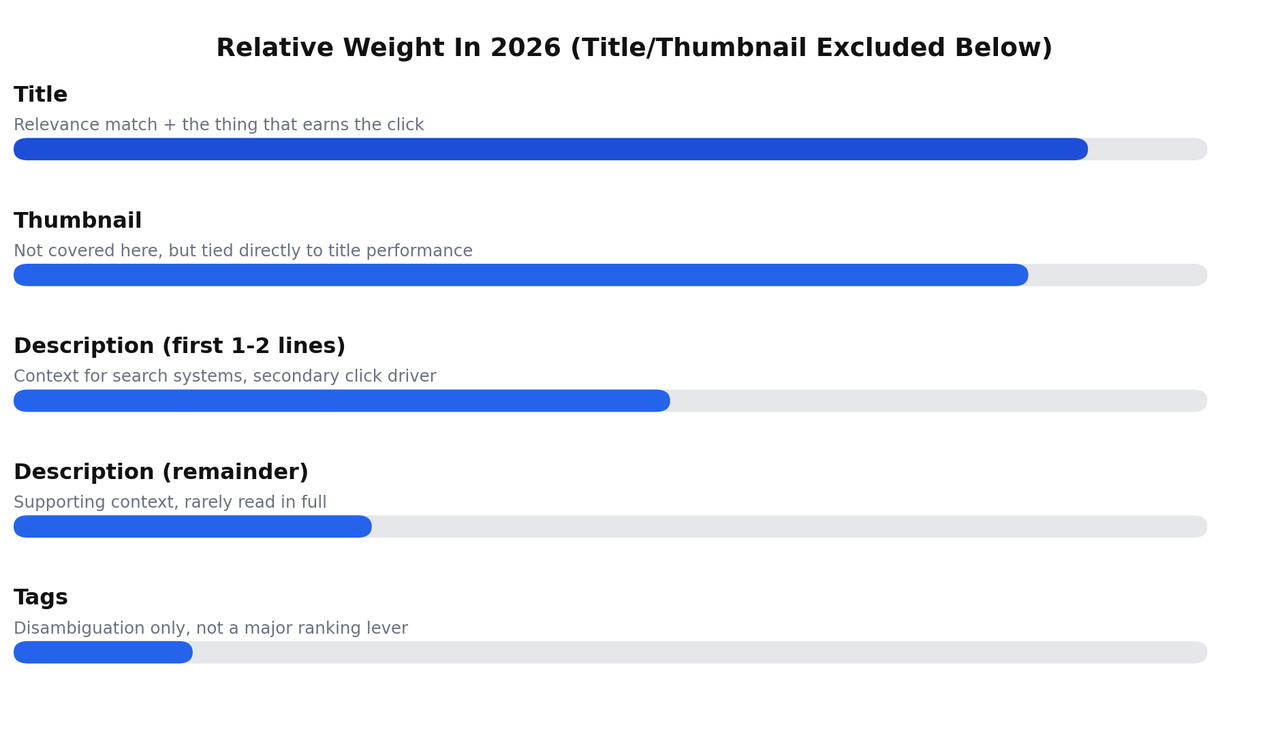
Title, description, and tags don't carry equal weight, and treating them as three roughly equal boxes to fill in is the single biggest reason most "YouTube SEO best practices" advice underperforms. The title does most of the actual work, matching your video to a real search and earning the click. The description's first line or two does meaningful supporting work. Tags do very little now, mostly disambiguation, not the ranking lever they were treated as a decade ago. Get the hierarchy right first, then the specific tactics inside each one actually matter.
This is the complete, current breakdown: what to actually do with each element, why it matters in that order, real examples of good and bad implementations, and a full workflow you can run on your next upload.
Why Title, Description, And Tags Don't Carry Equal Weight Anymore
YouTube evaluates a video for a given search primarily through relevance and performance: does the content match what was searched, and do people who click actually stay and seem satisfied relative to similar videos. Title sits closest to both of those. It's the first, strongest relevance signal YouTube reads, and it's the thing a searcher judges before clicking at all, which makes it responsible for both matching the query and earning the click in the first place.
Description and tags sit further downstream. The description's opening lines add context and can reinforce relevance, and the full description occasionally surfaces in search previews. Tags, since a 2023 change to how YouTube's own systems weight metadata, function almost entirely as disambiguation, helping YouTube understand an unclear title, not as an independent ranking lever you can strengthen by adding more of them. Treating all three as equally important is why people spend twenty minutes stuffing tags and thirty seconds on the title, when the ratio should be reversed.
Title Best Practices
The 60 To 70 Character Guidance, And Why It's Not A Hard Limit
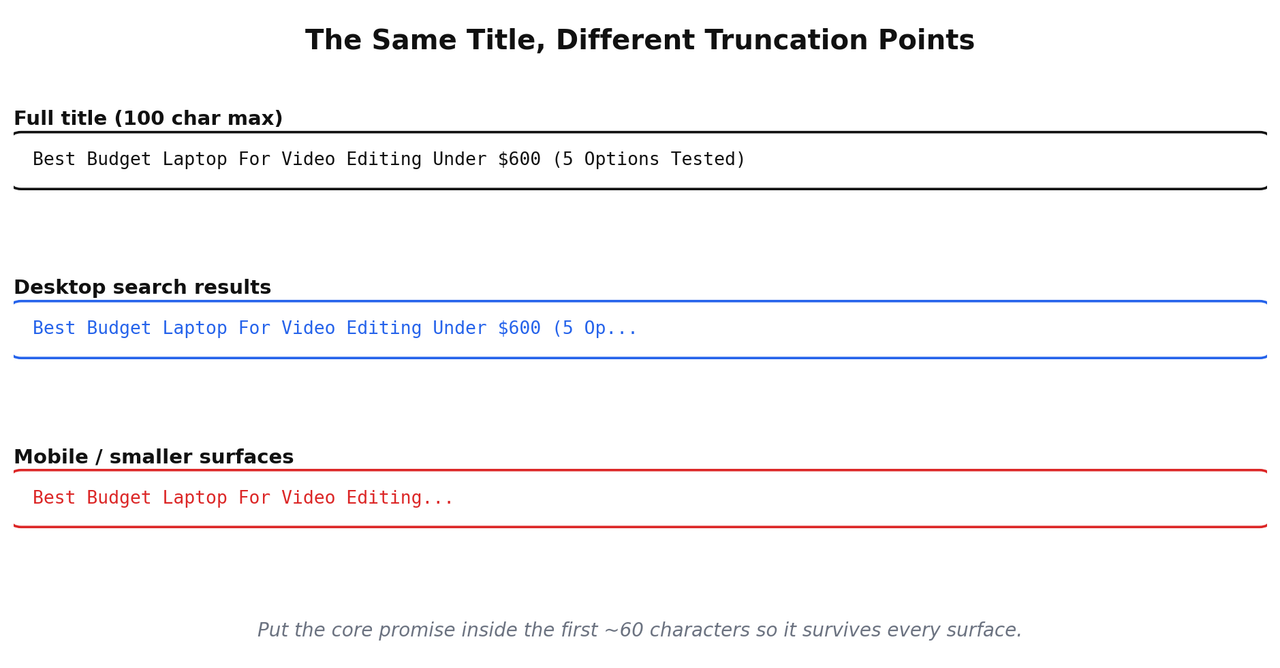
YouTube allows up to 100 characters in a title, but that number isn't the one that matters most day to day. On search results and most mobile views, titles get visually truncated well before 100 characters, commonly somewhere around 60 to 70 depending on the specific characters used and the surface displaying it. The practical guidance: put the core promise of the video inside the first 60 to 70 characters, and treat anything past that as a bonus that some viewers will see and others won't.
This isn't a rule to panic over if you go slightly past it. A 75-character title that gets its core meaning across in the visible portion is fine. An 80-character title that only makes sense once you read the full thing, with the important part buried at the end, is the actual problem.
Where To Put Your Keyword
Front-loading your primary keyword or topic, putting it near the beginning of the title rather than the end, helps in two separate ways. It's more likely to survive truncation on shorter display surfaces, and it gives both viewers and YouTube's systems an immediate, unambiguous read on what the video is about, rather than making them read the whole title to figure it out.
This doesn't mean starting every title with an awkward, robotic keyword dump. "Best Budget Laptop For Video Editing: 5 Options Under $600" front-loads the topic naturally. "5 Options Under $600 If You Want The Best Budget Laptop For Video Editing" buries the same information at the end for no real benefit.
Matching The Title To What The Video Actually Delivers
This is the single most consequential title practice, and it's the one generic advice mentions least. A title that oversells or misrepresents what the video actually covers tanks retention immediately after the click it just won, and weak retention actively works against the video's ranking for that exact search term afterward. The click without the follow-through isn't a partial win, it's a net negative.
Before publishing, read your title cold, as if you'd never seen the video, and ask honestly whether the video delivers exactly what it promises within the first couple of minutes. If the answer requires a caveat, "well, it sort of covers that eventually," fix the title or fix the video, don't publish the mismatch.
Good Titles Versus Bad Titles, Structurally
| Weak title | Why it's weak | Stronger version |
|---|---|---|
| My Thoughts On Budget Laptops | Vague, no specific search intent match | Best Budget Laptop For Video Editing Under $600 |
| You WON'T BELIEVE What This Laptop Can Do!!! | Curiosity-gap clickbait, no real information, mismatched to any specific search | This $500 Laptop Edits 4K Video Almost As Well As A $1,500 One |
| Laptop Review 47 | No searchable information at all | Acer Aspire 5 Review: Is It Actually Good For Video Editing? |
Title Structures Worth Reusing
Once a title structure has proven it converts and ranks, you don't need to reinvent the format for your next video, swap the variable and reuse the structure. "Best [product] for [specific use case]" is a structure. "[Number] Things About [topic] Nobody Tells You" is a structure. "[Product A] vs [Product B] For [specific use case]" is a structure. Keep a running list of ten or fifteen of these that work in your niche, and treat a new video idea as a question of which structure fits, not a blank page every single time.
Common Title Mistakes
Keyword stuffing inside the title itself, repeating a variation of the same term two or three times, reads as spam to a human scanning search results even when it's technically relevant. Vague titles that could apply to a dozen different videos fail to match any specific search intent precisely. And titles chasing a curiosity gap with no real informational content behind them, the "you won't believe" style, tend to convert on the first click and burn trust on every one after it, which shows up in weaker channel-level performance over time.
Numbers And Specificity In Titles
A specific number in a title, a price, a quantity, a percentage, tends to outperform a vague equivalent, because it signals exactly what the viewer is getting before they click. "Best Budget Laptops" is vague. "5 Laptops Under $600 That Handle 4K Editing" tells a searcher precisely what they're about to see and lets them self-select in or out before wasting a click. This isn't about gaming anything, it's about giving an honest, specific preview of the video's actual content, which happens to also be what performs well.
The same logic applies to years, model numbers, and concrete claims. "How To Fix This" is weaker than "How To Fix Error Code 0x80070057 On Windows 11." The specific version matches a specific search far more precisely, even though it looks narrower on the surface.
Should You A/B Test Titles
YouTube's built-in testing tools let you try multiple title and thumbnail combinations on a live video and see which performs better with real traffic, rather than guessing. This is worth using on videos that matter to your channel's core topics, not every single upload, since testing takes time to gather meaningful data and isn't worth the overhead on a minor, low-stakes video. If two title ideas both feel genuinely strong and honest to the content, test them rather than agonizing over which one to guess correctly upfront.
Description Best Practices
The First One Or Two Lines Do Almost All The Work
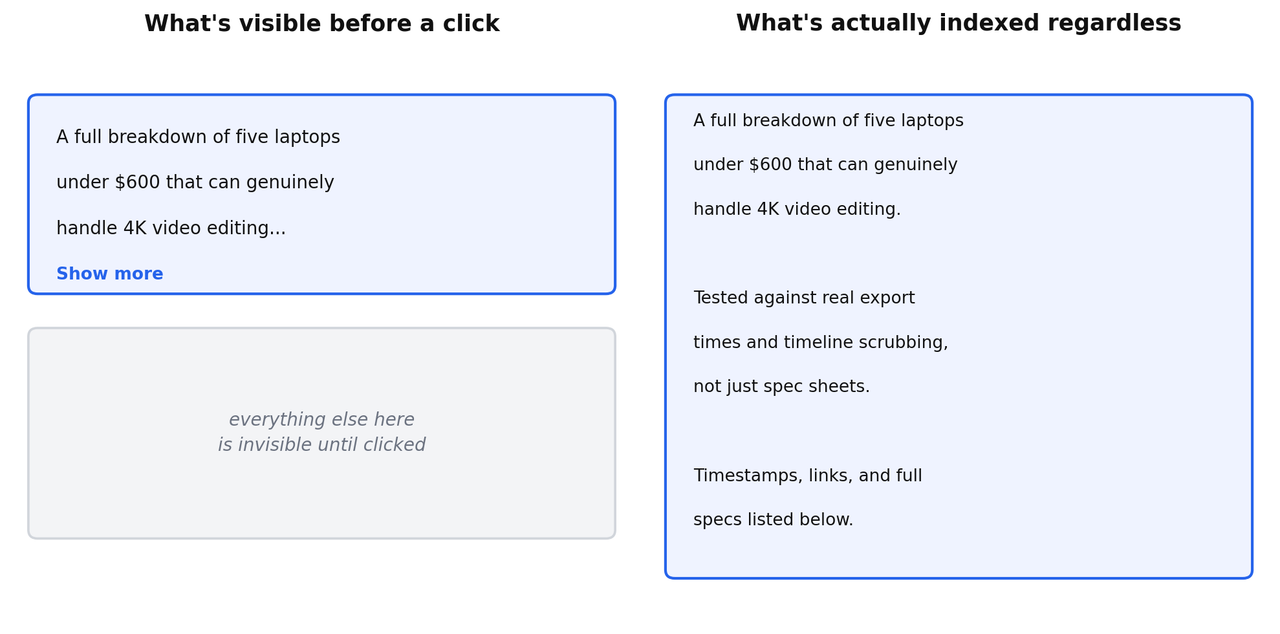
YouTube allows up to 5,000 characters in a description, but only the first line or two show before a viewer has to tap "show more." That visible portion needs to read as a real, useful sentence, not a keyword-loaded fragment, because it's doing two jobs simultaneously: giving a hesitant viewer a reason to actually click into the video, and giving search systems clean, specific context about what the video covers.
A weak opening line: "video about laptops budget editing 2026 best cheap." A strong opening line: "A full breakdown of five laptops under $600 that can genuinely handle 4K video editing without lag." Same underlying keywords, completely different amount of actual information conveyed.
What To Actually Put In The Full Description
Past the visible opening, use the space for a genuine, slightly longer summary of what the video covers, any relevant links, and additional context that helps both viewers and search systems understand the full scope of the content. This is also where affiliate links, sponsor mentions, and related video links belong. Don't leave the rest of the description empty just because most viewers won't scroll to see it, the full text still gets indexed and read by YouTube's systems even when a human never expands it.
How Long Should A Description Actually Be
There's no fixed ideal length, but a useful gut check: your description should be long enough to genuinely explain what the video covers and provide real context, and short enough that every sentence is still doing something, not padding toward an arbitrary word count. Two to four short paragraphs covering what the video is about, who it's for, and any relevant links is a reasonable target for most videos. A single line is usually too thin. Fifteen paragraphs of repeated keyword variations is actively counterproductive.
Timestamps And Chapters
If your video has distinct sections, adding timestamps in the description, formatted correctly, automatically generates visual chapters on the video's timeline once you have at least three timestamps, each ten seconds apart, starting at 0:00. Beyond the obvious navigation benefit for viewers, chapters give search systems an explicit, labeled breakdown of what happens at each point in the video, which is more precise information than what they'd have to infer from a transcript alone.
Links, Calls To Action, And Disclosure
Put your most important link, whatever you actually want the viewer to click, near the top of the description, right after your opening summary, not buried at the bottom under a wall of text. If you're using affiliate links, disclose that clearly and near the relevant link, both because it's the honest thing to do and because it's a real legal requirement in most jurisdictions, not just a suggestion.
Common Description Mistakes
An empty or near-empty description wastes real, free context that could be helping both viewers and search systems understand the video. A description that's nothing but repeated keyword phrases with no actual sentences reads as spam and provides little genuine relevance signal. And burying your most important link at the very bottom of a long description means most viewers who would have clicked it never scroll far enough to find it.
Description Length For Shorts Versus Long-Form Videos
Shorts benefit from a much shorter description than long-form content, often just one or two lines, since the format itself is built around speed and the description plays a smaller role in how Shorts get surfaced compared to long-form search. Long-form video descriptions can carry more genuine weight and deserve the fuller treatment described above. Don't copy a long-form description template onto a Shorts upload, it won't help and it clutters something meant to be quick.
Multiple Languages And Localized Descriptions
If a meaningful share of your audience searches in a different language than your primary one, YouTube supports adding localized titles and descriptions for specific languages, which can be genuinely worth the effort for a channel with real international reach. This is a lower-priority optimization for most channels starting out, worth revisiting once you have real data showing where your traffic is actually coming from, rather than guessing upfront which languages deserve the extra work.
Tags Best Practices
What Tags Actually Do In 2026
Tags exist mainly to help YouTube disambiguate a title or topic that could reasonably mean more than one thing, not to function as an independent keyword-stuffing opportunity the way they were sometimes treated years ago. A video titled clearly enough often doesn't need many tags at all for YouTube to understand what it's about. Tags earn their keep specifically when your title or topic is genuinely ambiguous on its own.
How Many Tags, And In What Order
There's no magic number, but a reasonable approach is five to eight relevant, specific tags rather than the fifteen or twenty some older advice recommends. Put your most important, most specific tag first, then move toward broader, more general terms. A video about a specific laptop model might use the exact model name first, then the broader category, then the general use case.
Broad Tags Versus Specific Tags
Specific tags tied closely to your actual content do more useful disambiguation work than broad, generic tags that apply to thousands of unrelated videos. A tag like "laptop" on its own is nearly meaningless, since it could apply to almost any video in the category. A tag like the exact model name or a specific, narrow use case does real disambiguation work.
Tools For Tag Research
If you want to see what tags competing videos are using, a browser extension like vidIQ or TubeBuddy will show you this directly on any video page, free plans included. This is useful for understanding how competitors are categorizing similar content, though it's worth remembering that copying a competitor's tag list wholesale doesn't transfer their ranking, since tags are a small supporting signal, not the mechanism actually driving their performance.
Common Tag Mistakes
Loading up on broad, generic tags that apply to a huge, unrelated pool of content adds little real disambiguation value. Using a competitor's channel name or a completely unrelated trending term as a tag, hoping to piggyback on their traffic, doesn't work the way people assume and can read as manipulative. And leaving tags completely empty on a genuinely ambiguous title removes one of the few tools YouTube has to correctly categorize an unclear video.
Do Hashtags Count As Tags
Hashtags placed in a description or title are a separate mechanism from the tags field in your upload settings, and they serve a slightly different purpose, mainly linking a video into a broader hashtag-based browsing category rather than functioning as a search disambiguation signal. Up to three hashtags can display above your title. Beyond that number, YouTube stops displaying them, though they may still exist in the description text. Use one or two genuinely relevant hashtags if it fits your niche's conventions, and don't treat hashtag count as a separate optimization project on top of your actual tags field.
How Title, Description, And Tags Actually Work Together
The real goal across all three isn't independent optimization of each field, it's semantic consistency: the title, the description, the tags, and the spoken content of the video itself should all genuinely describe the same specific thing. When they align, YouTube's systems get a clean, unambiguous read on relevance. When they conflict, a title promising one thing and a description or spoken content covering something else, that inconsistency works against the video rather than giving it three separate chances to rank for different terms.
What Changed Between Older SEO Advice And Now
Older, still widely repeated advice treats YouTube SEO as roughly parallel to early-2010s web SEO: stuff the keyword into every field, repeat it as many times as feels reasonable, and trust that density itself helps. That approach reflected a period when YouTube's systems leaned more heavily on literal keyword matching in metadata. The current system evaluates relevance more semantically, understanding topical meaning rather than just matching exact strings, and weighs performance signals, retention, satisfaction, session behavior, far more heavily than metadata density ever mattered even at its peak. Following 2015-era tag-stuffing advice in 2026 doesn't just fail to help, it actively signals a lower-effort, less carefully made video relative to one built around genuine relevance and follow-through.
Title, Description, And Tags For YouTube Shorts Specifically
Shorts and long-form videos run on separate recommendation systems, and the metadata priorities shift accordingly. For a Short, the title still matters, but it competes for attention in a swipe-based, sound-on, fast-consumption format, so a shorter, punchier title that reads instantly tends to outperform a longer, more descriptive one that works well for long-form search. Completion rate and rewatch behavior dominate Shorts performance far more than the metadata does, so don't expect the same careful title-and-description work that moves a long-form video's ranking to have an equivalent effect on a Short.
Descriptions on Shorts should stay brief, a single clear line is usually enough. Tags matter even less here than on long-form, since Shorts distribution leans heavily on the video's own opening seconds and completion signals rather than metadata-driven search matching. Don't port your long-form metadata habits directly onto Shorts and expect the same return on the effort.
Common Myths About YouTube SEO Metadata, Debunked
Myth: More tags always help. Beyond a handful of specific, relevant tags, additional tags add little value and can occasionally dilute relevance if they're only loosely related. Five to eight focused tags outperform twenty scattered ones.
Myth: Repeating your keyword multiple times in the description boosts ranking. Modern relevance matching understands topical meaning rather than counting keyword occurrences. Repetition reads as spam rather than reinforcing relevance, and can actively hurt how the description is perceived by both viewers and search systems.
Myth: You should copy a top-ranking competitor's tags exactly. Tags are a small supporting signal. Copying them doesn't transfer the performance signals, retention, satisfaction, session behavior, that are actually driving that competitor's ranking. At best it's neutral. At worst, tags irrelevant to your specific video's actual content add confusion rather than clarity.
Myth: A longer description always ranks better than a short one. Length isn't the variable that matters, genuine, specific information is. A short, precise description that clearly explains the video can outperform a padded, repetitive long one.
Myth: Changing your title after publishing hurts your ranking. Editing a title after publishing doesn't inherently damage a video's standing. What can hurt performance is changing a title to something that no longer matches the content or the search terms that were already bringing it traffic, which resets relevance matching rather than improving it.
A Second Worked Example, Different Niche
To show this isn't specific to product-review content, here's the same principle applied to a recipe video.
Weak version. Title: "Amazing Pasta Recipe You Need To Try 2026." Description: "pasta recipe easy quick dinner amazing best pasta recipe 2026 try this." Tags: pasta, recipe, food, cooking, dinner, easy, quick, amazing, 2026, best, delicious, yummy.
Strong version. Title: "One-Pot Garlic Butter Pasta In 15 Minutes (No Fancy Ingredients)." Description opens with: "A genuinely 15-minute one-pot pasta recipe using ingredients you probably already have, no cream, no hard-to-find cheese, just garlic, butter, and pantry staples." followed by the full ingredient list, timestamps for each step, and a link to a related recipe. Tags: "one pot pasta recipe," "15 minute pasta," "garlic butter pasta," then broader terms like "easy weeknight dinner."
The specific version tells a hesitant searcher exactly what they're getting, time required, ingredient simplicity, format, before they even click, which is precisely what both a real viewer and YouTube's relevance systems are trying to assess.
A Real Pre-Publish Workflow
Write your title first, built around the specific search or problem the video answers, and check it reads clearly within the first 60 to 70 characters. Write your description's opening line as a genuine, complete sentence summarizing the video, then add a fuller summary, relevant links near the top, and timestamps if the video has distinct sections. Add five to eight specific, relevant tags, ordered from most specific to most general, focusing on disambiguation rather than volume. Before you publish, read the title, description opening, and video content together and confirm they all describe the same specific thing without contradiction. If you want the compact, checklist version of this same workflow to run through quickly on every upload, I've built that separately in the only YouTube SEO checklist you need before you hit publish.
A Full Worked Example: Weak Versus Strong
Weak version. Title: "Laptop Review 2026 Best Cheap Budget Editing Laptop Good." Description: "laptop review 2026 best budget cheap editing laptop good video editing laptops." Tags: laptop, review, 2026, best, cheap, budget, editing, video, computer, tech, technology, good, review, buy.
Everything here is technically "on topic" and does almost nothing useful. The title is unreadable and doesn't clearly promise anything specific. The description repeats the same fragment instead of explaining the video. The tags are broad, repetitive, and mostly meaningless.
Strong version. Title: "Best Budget Laptop For Video Editing In 2026 (Under $600)." Description opens with: "Five laptops under $600 that can genuinely handle 4K video editing without lagging, tested against real export times and timeline scrubbing, not just spec sheets." followed by a fuller breakdown, relevant links, and timestamps. Tags: specific model names tested in the video, "budget laptop for video editing," "laptop for 4K editing under 600," then broader terms like "budget laptop 2026."
Same underlying topic, dramatically different amount of real, specific information conveyed to both a viewer deciding whether to click and a search system deciding whether this video actually answers the query.
The Tools Worth Using For Each Element
You don't need a paid subscription to do any of this well, though the right free tool speeds up each step considerably. For title research, start with YouTube's own search bar autocomplete, typing your topic in and reading the suggested completions gives a free, real-time read on what people are actually searching, straight from YouTube itself. For a deeper check on how competitive a specific title idea is, the free tier of vidIQ or TubeBuddy overlays search volume and competition data directly on YouTube as you browse, letting you sanity-check a title idea against real numbers before you commit to it.
For description writing, there isn't a specialized tool that matters much, this is a writing task more than a research task, the main discipline is making sure the opening line is a genuine sentence rather than a keyword fragment. For tag research specifically, the same vidIQ or TubeBuddy extensions show you the tags a competing video is using, useful context, though remember that copying them wholesale doesn't transfer their actual ranking drivers. I've broken down the full free tool landscape in more depth, including exactly which free features are worth using for which task, in the best free YouTube SEO tools, tested and ranked.
Metadata For Playlists, Not Just Individual Videos
Playlist titles and descriptions get less attention than individual video metadata, and they're worth a genuine pass rather than an afterthought. A playlist title built around a specific, searchable topic, "Budget Video Editing Laptops Compared" rather than just "Laptops," can itself surface in search results independently of any single video inside it. The playlist description deserves the same first-line discipline as a video description, a real, specific sentence explaining what the playlist covers and who it's for, not a placeholder left blank.
This matters beyond just an extra ranking opportunity. A well-organized, clearly titled playlist keeps a viewer moving from one video into the next, which extends their session on your channel, a signal that feeds directly into how favorably your content gets treated going forward. Grouping related videos into a playlist with real, considered metadata is one of the more overlooked, genuinely free wins available on a channel that already has some back catalogue built up.
How Consistency Across All Three Actually Plays Out
Take a single example through all three fields to see the consistency principle concretely. A video titled "Best Budget Laptop For Video Editing Under $600" should have a description whose opening line reinforces that exact framing, not a generic restatement of "laptops for editing" that drifts from the specific price point and use case the title promised. The tags should include the same specific phrase, "budget laptop for video editing," alongside close variants, rather than pivoting to unrelated broader terms like "tech review" or "gadgets" that dilute the specific angle the title already committed to.
When all three fields plus the actual spoken content of the video reinforce the same specific claim, search systems get an unambiguous, well-supported signal about exactly what the video is and who it's for. When they drift, even subtly, a title about editing performance paired with a description focused mostly on battery life, the video ends up only partially matching several different searches instead of fully matching one specific one, which tends to perform worse across the board than committing fully to a single, well-supported angle.
When Metadata Habits Cross Into Real Policy Risk
Beyond just being ineffective, some metadata habits carry real risk to a channel's standing. Using misleading tags or descriptions that don't genuinely reflect a video's content, sometimes called metadata spam, is a real, enforceable violation, not just a weak tactic. Titles designed purely to bait a click with no connection to the actual content, and channels where every title, description, and tag set follows an identical, interchangeable template with no real distinguishing content, can trigger the same scrutiny that applies to mass-produced, templated content generally. I've covered exactly where that line sits in detail in what actually counts as inauthentic content on YouTube, worth reading alongside this if you're publishing at real volume, since the metadata patterns described there are evaluated at the whole-channel level, not just video by video.
The practical takeaway is the same one running through this entire article: metadata that genuinely, specifically describes real content protects you on both fronts at once, it performs better and it stays clearly on the right side of what the platform considers legitimate. Metadata built to game a system rather than describe real content tends to fail at both simultaneously.
Frequently Asked Questions
Do tags still matter for YouTube SEO in 2026?
Some, but far less than title and description. Tags mainly help disambiguate an unclear title rather than functioning as an independent ranking lever. Spend the majority of your optimization time on the title first, then the description's opening line.
How long should a YouTube title be?
Up to 100 characters is technically allowed, but aim to convey the video's core promise within the first 60 to 70 characters, since that's what stays visible across most display surfaces before truncation.
Should I put keywords in my description multiple times?
No. A single, clear, natural mention of your topic in the opening line does more than repeated keyword variations, which read as spam to both viewers and increasingly sophisticated search systems.
Is it better to have more tags or fewer, more specific ones?
Fewer, more specific tags. Five to eight tags genuinely tied to your content do more real disambiguation work than fifteen or twenty broad, generic ones.
Can a good description make up for a weak title?
Not really. The title is what earns the click and carries the strongest relevance signal. A strong description supports a good title, it doesn't rescue a vague or mismatched one.
Should Shorts use the same title and description approach as long-form videos?
No. Shorts favor shorter, faster-reading titles and minimal descriptions, since the format's performance depends far more on completion rate and rewatch behavior than on metadata-driven search matching.
Does editing a title after a video is already published hurt its ranking?
Not inherently. What can hurt performance is changing a title to something that no longer matches the video's actual content or the search terms it was already ranking for, which resets relevance rather than improving it.
Should I use the exact same tags on every video?
No. Tags should reflect each specific video's actual content. A reused, generic tag set across your whole channel provides little disambiguation value for any individual upload.
Do hashtags in the description work the same way as the tags field?
No, they're separate systems. Hashtags mainly connect a video to a browsable hashtag category, while the tags field primarily helps disambiguate an unclear title. Both matter less than title and description, but they aren't interchangeable.
Is it worth localizing titles and descriptions into other languages?
It can be, but mainly once you have real data showing meaningful traffic from viewers in another language. It's a lower priority than getting your primary title and description right first.
The Actual Priority Order
If you only have twenty minutes before publishing and have to choose where to spend it, spend fifteen of those minutes on the title and the first line of your description, and the remaining five on tags and the rest of the description. That ratio reflects how much each one actually contributes, not the equal, mechanical attention most checklists imply. Get the title right, make the description's opening line a real sentence instead of a keyword fragment, and treat tags as a small, useful finishing touch rather than the main event.
None of this requires expensive tools or years of experience to execute correctly. It requires treating each field as a genuine, specific description of what a real video actually contains, in the right order of priority, rather than three separate boxes to fill with the same handful of keywords repeated in slightly different arrangements. Do that consistently across your next ten uploads, and the difference will show up in your search traffic long before it shows up in any dashboard telling you why.
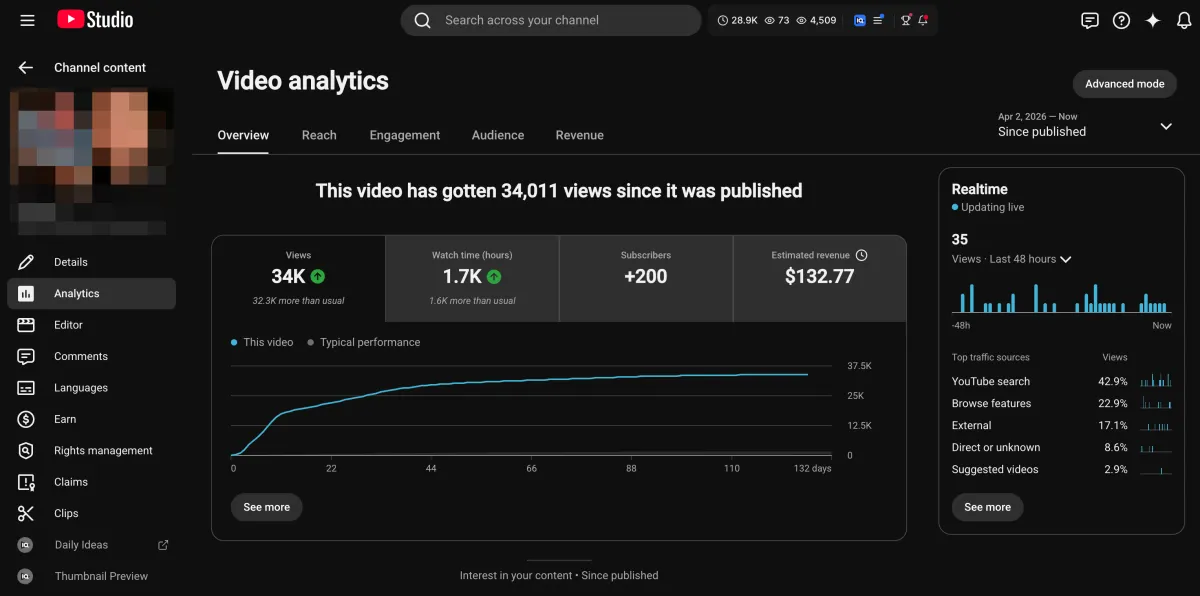
Learn how I turned a $132.77 video into $1000+ per month asset
Full case study on how you can replicate my success with YouTube SEO strategy.
Free downloadThe Zero Audience System
Build permanent YouTube income without a camera or an audience
The full methodology, 31 lessons plus bonuses. Limited spots.