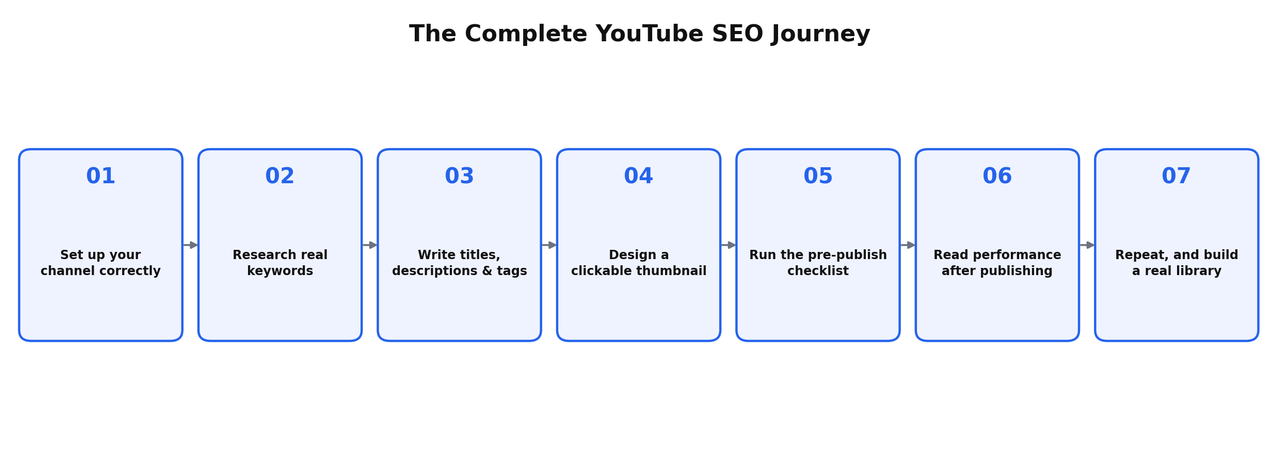
This is the complete path from knowing nothing about YouTube SEO to running a real, repeatable process, in the order it actually needs to happen. Every section links to a deeper, dedicated breakdown if you want to go further on a specific step, but you can read this one guide start to finish and walk away with everything you need to publish your first properly optimized video today.
Most beginner guides on this topic stop at "add keywords to your title and tags." That's a small, outdated fraction of what actually determines whether a video gets found. This guide covers the whole picture: setup, research, packaging, publishing, and what to actually do once the video is live, along with the mistakes that quietly kill most channels before they ever get a fair chance.
Understanding Search Intent Before You Do Anything Else
Every step in this guide depends on one skill: correctly reading why someone is searching a specific term, not just what words they typed. The same keyword can hide completely different intents. Someone searching "best budget laptop" might be ready to buy today, or might be three weeks away from a purchase and still comparing options, or might just be curious what's out there with no plan to buy anything soon. A video built for the wrong intent can rank and still convert nobody, and a video built for the right intent can succeed with a smaller audience than you'd expect.
Before scripting anything, watch the current top results for your target term and ask what they assume about the viewer. If every top result treats the searcher as a complete beginner, and you suspect a meaningful share of that search volume comes from people with some experience looking for a specific detail, that gap is often more valuable than the raw search volume number suggests. Matching intent more precisely than what's currently ranking is one of the most reliable ways a new, smaller channel outperforms an established one.
What YouTube SEO Actually Is
YouTube SEO is the process of structuring a video, and the decisions around it, so it matches what someone is actually searching for and satisfies that search well enough that YouTube keeps recommending it afterward. It isn't a one-time metadata task you finish before publishing. It's an ongoing practice that includes how you research topics, how you package a video, and how you read its performance once it's live.
The most common misconception is that this is fundamentally the same skill as website SEO. It isn't. Website SEO leans heavily on backlinks and domain authority. YouTube leans on watch time, retention, and satisfaction signals specific to video consumption. I've broken down that full distinction, including a real study showing the same video often ranks in completely different positions on Google search versus YouTube's own search, in is Google SEO the same as YouTube SEO, and the deeper definitional breakdown in what is YouTube SEO, and why most explanations get it wrong.
Why This Matters More Than Most Beginners Realize
A video built around a specific, real search term can keep getting found for years after you publish it, with no additional promotion. A video built around a broad, trend-chasing topic gets a short burst of attention and then goes quiet. That difference, evergreen search traffic versus a temporary spike, is the entire reason SEO matters more for a new channel than almost any other single skill, including editing or on-camera presence.
Three Ranking Systems, Not One "Algorithm"
Beginners often talk about "the algorithm" as if it's one thing. It isn't. YouTube runs separate systems for Search, the Home and Suggested feeds, and Shorts, each weighing different signals.
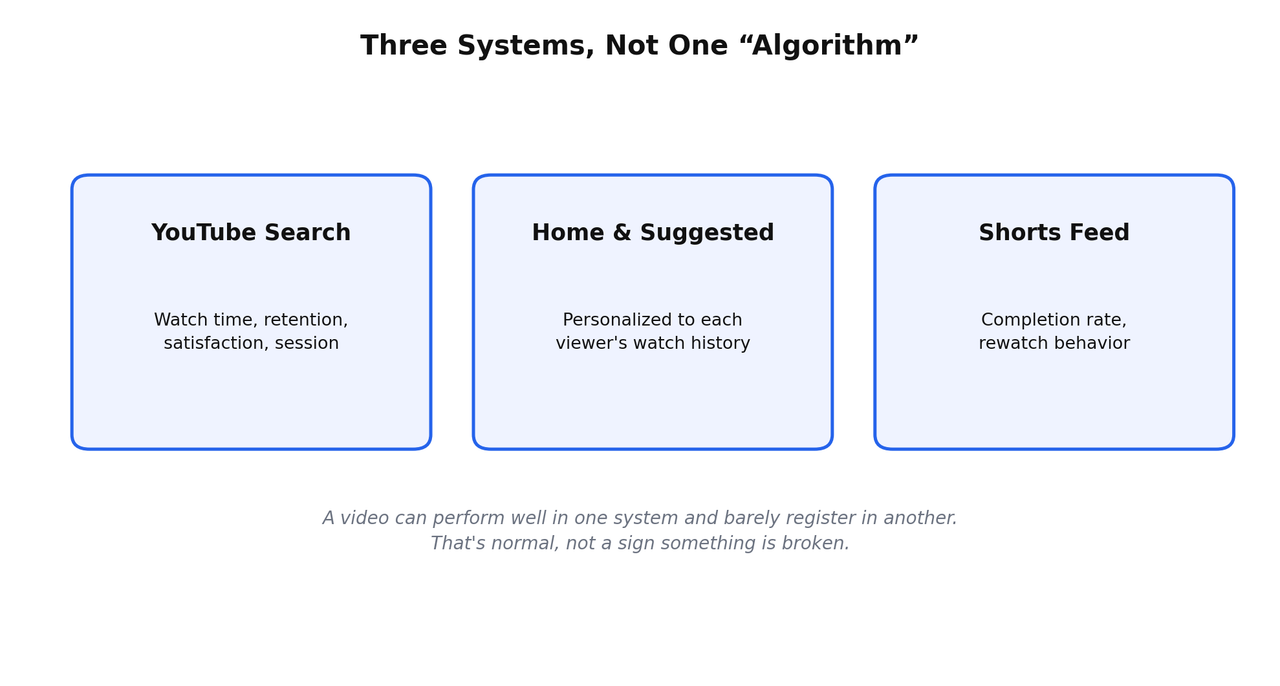
A video built specifically around a search term should be judged on how well it performs in Search, not on whether it also goes viral in the Home feed. Confusing these systems is one of the most common reasons beginners misjudge whether a video actually worked. For the complete breakdown of every individual signal feeding into these systems, see what actually determines YouTube ranking factors.
Step 1: Set Up Your Channel Correctly
Before any of the SEO work matters, the channel itself needs a few things in place. Create a Google account dedicated to this if you don't already have one, then set up a Brand Account rather than running the channel off your personal account, since that separation makes adding collaborators or transferring ownership easier later. Add a clear banner and profile image, fill out your About section honestly, and don't overthink the channel name, it matters far less than people assume for a channel built around search rather than personal branding.
There's also a real, often-skipped technical setup phase, verifying your account, understanding upload defaults, and getting your channel's basic settings right before your first real upload. I've covered that complete pre-launch process in how to warm up a new YouTube channel. If you're building a faceless channel specifically, the setup considerations shift slightly, covered separately in how to start a faceless YouTube channel with zero experience, and the general, format-agnostic starting process in how to start a YouTube channel in 2026.
Step 2: Research Real Keywords, Not Guesses
This is the step that actually separates a channel that compounds from one that doesn't. Start with a topic you genuinely understand, then narrow it down to specific, searchable problems within it rather than broad, vague ideas. Pull real suggestions from YouTube's own autocomplete and a proper keyword tool, filter by search volume before difficulty, and always verify a keyword's real competition by watching the current top-ranking videos directly, not just trusting a tool's difficulty score.
What "Low Competition, High Traffic" Actually Means
High traffic doesn't mean millions of searches, it means enough real demand for a channel your size to capture a meaningful share of it. Low competition isn't just a difficulty number either, it's whether the videos currently ranking are outdated, thin, or from channels no more established than yours. A keyword can carry a low difficulty score and still be worthless if nobody searches it, and a keyword with a moderate score can be genuinely winnable if the current top results are weak once you actually watch them.
A Simple Research Workflow For A Beginner
- Type your seed topic into YouTube's search bar and read the autocomplete suggestions, free, direct signal from the platform itself.
- Run the same seed through a free keyword tool that shows both search volume and a difficulty estimate.
- Set a minimum volume threshold based on your channel's current size, then sort by difficulty within that shortlist.
- Open the top three to five results for your best candidates and check how recent, thorough, and well-established the competing videos actually are.
- Test two or three phrasings of your strongest idea, since nearly identical phrases can carry very different difficulty scores.
One thing worth knowing as a beginner: nearly identical phrasings of the same idea can carry wildly different difficulty scores. I pulled live keyword data proving this directly in how to find low competition keywords with high traffic for YouTube videos, worth reading in full before you finalize your first few video topics. For the free tools that make this research possible without spending anything, see the best free YouTube SEO tools, tested and ranked, and for ongoing education from real, verified sources, the best YouTube channels to learn SEO from.
Step 3: Write Titles, Descriptions, And Tags That Actually Work
Title, description, and tags don't carry equal weight, and that hierarchy should shape how much time you spend on each.
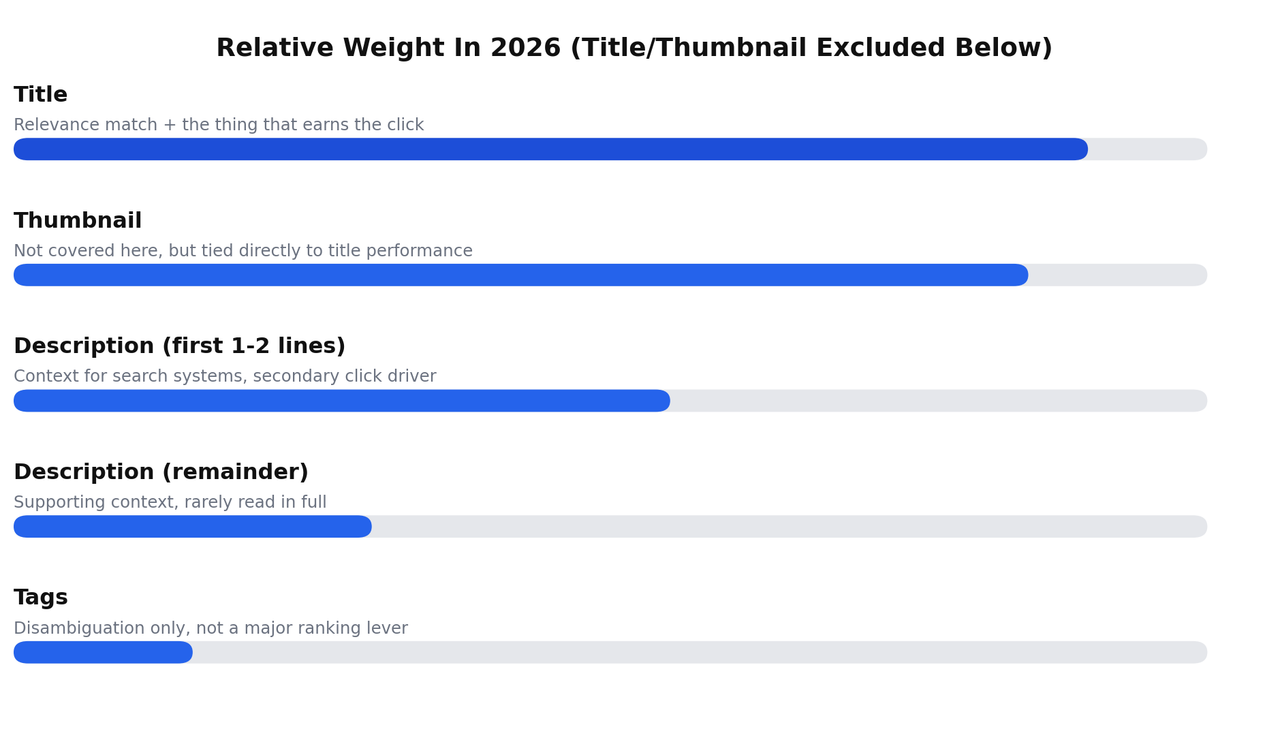
Put your keyword near the front of the title, keep the core promise inside the first 60 to 70 characters so it survives truncation on mobile and search results, and make sure the title matches exactly what the video delivers, since a mismatch tanks retention immediately after the click. Your description's first one to two lines matter far more than the rest of it, since that's what's visible before someone taps "show more." Tags matter least of the three now, mostly helping disambiguate an unclear title rather than functioning as an independent ranking lever.
I've covered every one of these elements in exhaustive, example-driven detail, including two full worked examples in different niches, in YouTube SEO best practices for title, description, and tags. That article alone runs close to 5,000 words and is worth reading in full once you're ready to go deeper than this section.
A Quick Before-And-After Example
A weak version of a video about budget laptops might look like: "Laptop Review 2026 Best Cheap Budget Editing." Vague, borderline unreadable, and it doesn't clearly promise anything specific to a searcher. A strong version: "Best Budget Laptop For Video Editing Under $600 (5 Options Tested)." Same underlying topic, a specific price point, a specific use case, and a specific number, all of which help both a human deciding whether to click and YouTube's systems deciding whether the video actually matches the search.
Consistency Across All Three Fields Matters More Than Any One Of Them
The real goal isn't independently optimizing title, description, and tags in isolation, it's making sure all three, plus the video's actual spoken content, describe the same specific thing. A title promising one thing paired with a description or tags drifting toward something broader sends a mixed, weaker signal than committing fully to one specific angle across every field.
Step 4: Design A Thumbnail That Actually Earns The Click
Your thumbnail and title work together to earn the click, and a technically perfect title with a weak thumbnail still underperforms. Keep your thumbnail to one clear focal point, readable at a small size, and avoid placing anything important in the bottom-right corner, since YouTube automatically overlays the video's duration there regardless of what you design. A thumbnail that just repeats your title in text form wastes the one piece of visual space that could be adding something the title doesn't already say.
Technical Specs Worth Getting Right
Use a 16:9 aspect ratio at 1280x720 minimum, with 3840x2160 now recommended for future-proofing against higher-density screens. Keep the file under 2MB to be safe across devices, saved as a JPG at roughly 85 to 90% quality for the best balance between file size and visual sharpness. These aren't arbitrary numbers, a thumbnail that gets compressed or cropped unexpectedly at upload can look noticeably worse than what you designed.
Step 5: Run The Pre-Publish Checklist Every Single Time
Before you hit publish, run through the same checklist on every video, not just the ones you remember to double-check. Title, thumbnail, description, chapters if the video has distinct sections, accurate captions, playlist placement, and the audience and AI-disclosure settings all take a few minutes to confirm and can meaningfully affect a video's performance if skipped.
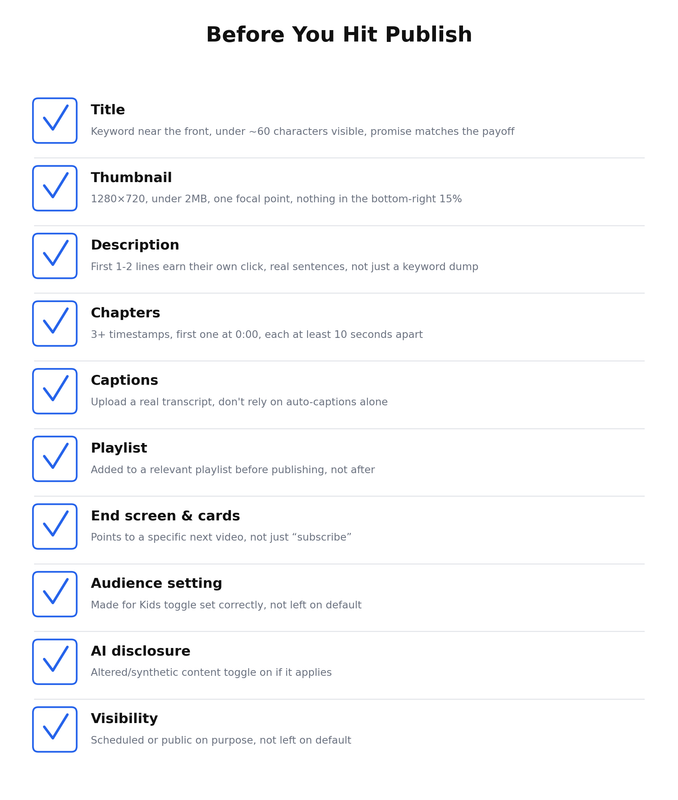
The complete, detailed version of this checklist, including exact technical specs for thumbnails and captions, is covered in full in the only YouTube SEO checklist you need before you hit publish.
Step 6: Read Performance After Publishing, Not Just Views
Views alone don't tell you whether a video actually worked. Once a video is live, check the retention graph specifically for sharp, sudden drop-offs, since those point to an exact, fixable moment in the video, not just a general sense that it "did okay." Use this as an editing tool for your next video, not just a report card on the one you already made.
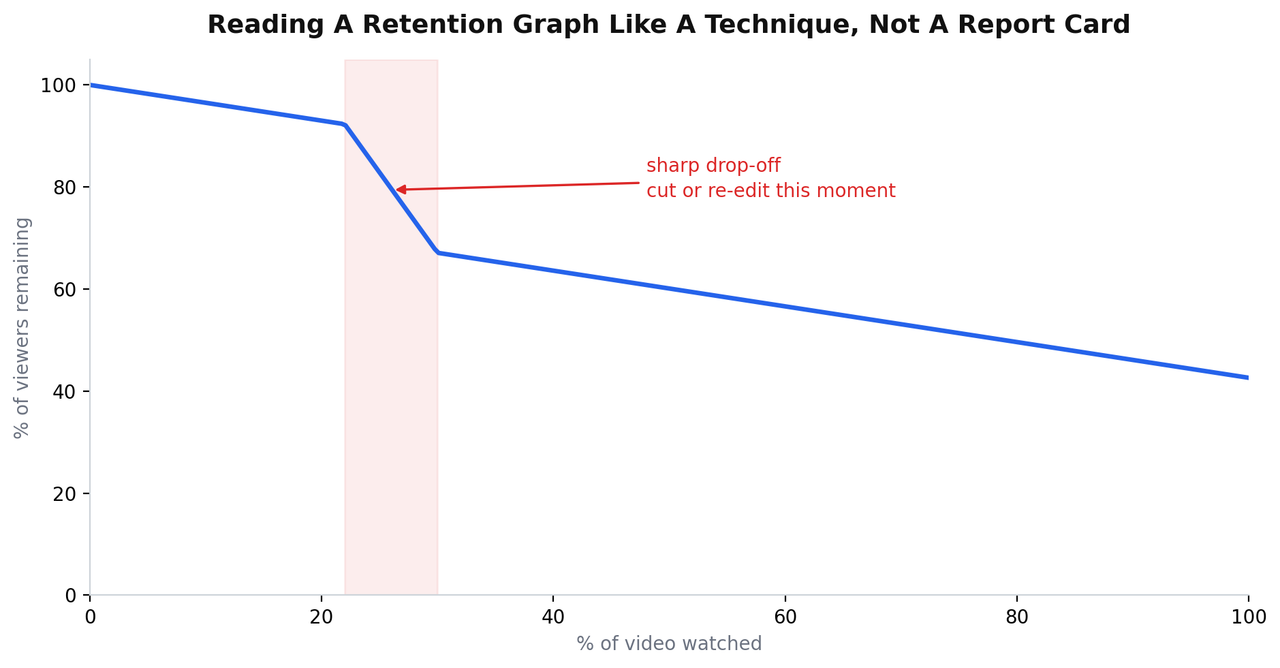
Beyond retention, check click-through rate relative to your channel's average, and if you want to know whether a topic is still genuinely in demand months later, Views Per Hour combined with the video's view history pattern tells you far more than raw view count alone. Both of these techniques, along with several others most creators never use, are covered in YouTube SEO optimization techniques, the real truth, and the VPH-specific method in the best free YouTube SEO analyzer in 2026.
Step 7: Repeat, And Build A Real Library
One video, however well optimized, doesn't build a channel. A library of dozens of specific, evergreen videos does, since each one independently attracts the exact viewer searching for that specific problem, and the whole collection compounds over months. This is the actual mechanism behind channels that grow from zero without any existing audience, and I've covered that complete philosophy, along with a realistic 90-day starting plan, in how to build an audience from zero on YouTube.
A Realistic Timeline: What To Expect Month By Month
Knowing what's normal at each stage prevents the single most common reason beginners quit, judging a channel's potential before there's enough data to judge anything. Months one through three typically show very little movement, regardless of how well the content is made, since YouTube's systems need real behavioral data before confidently recommending anything from a new channel. Months three through six is usually when the first genuine signals appear on channels built around specific, evergreen topics, a video that keeps climbing slowly instead of spiking and fading. Months six through twelve is where it tends to compound, since earlier videos are still gaining traffic while newer ones benefit from everything learned in between.
This timeline assumes consistent publishing around specific, well-researched topics. Trend-chasing content can spike faster and fade faster, which feels exciting early and often stalls out precisely when the search-driven approach starts to pull ahead.
Common Beginner Mistakes Worth Avoiding From Day One
- Stuffing tags with broad, generic terms instead of a handful of specific, relevant ones.
- Judging a video's success within the first 48 hours, before YouTube's systems have gathered enough data to place it accurately.
- Writing a title that oversells what the video delivers, which tanks retention immediately after the click.
- Skipping caption accuracy and relying entirely on auto-generated captions, which frequently mistranscribe names and technical terms.
- Chasing broad, trending topics instead of specific, evergreen ones that keep generating search traffic for years.
- Buying expensive equipment or paid tools before publishing a single video, solving a problem that doesn't exist yet.
- Publishing without any way to track what's actually converting, then guessing at what's working months later.
- Treating subscriber count as the main success metric instead of tracking watch time and real conversions.
Free Tools You Actually Need At Each Stage
| Stage | Tool |
|---|---|
| Keyword research | YouTube's own search bar, plus a free keyword tool with volume and difficulty data |
| Checking real-time momentum | Views Per Hour via a free browser extension |
| Thumbnail design | Any free design tool with a YouTube-sized template |
| Pre-publish metadata check | A free text-based SEO checker, used as a sanity check, not a scorecard |
| Post-publish performance | YouTube Studio's own analytics, free and already built in |
None of this requires a paid subscription to start. For a full, honest comparison of every free tool worth using and which ones actually measure something meaningful versus which ones just look impressive, see the free YouTube SEO checker that actually tells you something useful.
Once You're Ranking: What Comes Next
Once you understand the fundamentals, the next real skill is targeting a specific keyword deliberately and building a video designed to outrank whatever's currently sitting on top of it. That process, including how to pick a genuinely winnable keyword and what to do if you're still not ranking after a few months, is covered in full in how to rank number one on YouTube search.
A Quick Word On Monetization
SEO is what gets a video found. Monetization is a separate system layered on top of it, and it's worth understanding early even if you're months away from qualifying. Ad revenue rates vary enormously by niche, commonly ranging from roughly $2 to $15 per thousand views, covered in detail in YouTube RPM by niche, alongside the fuller pay-per-view mechanics in how much YouTube actually pays per view. Beyond ad revenue, a real channel typically stacks several income sources together, covered completely in faceless YouTube channel monetization, every way to actually get paid.
Frequently Asked Questions
How long does it take to see results from YouTube SEO?
Typically two to three months before any meaningful signal appears on a new channel, with more consistent traction developing between months three and six for channels built around specific, evergreen topics. Judging results before that window has passed is judging them too early.
Do I need to know keyword research to do YouTube SEO well?
Yes, it's the foundation everything else is built on. A perfectly optimized title and thumbnail on a video aimed at the wrong topic still won't find an audience, since the topic itself determines whether real search demand exists at all.
Is YouTube SEO different for Shorts than for long-form videos?
Yes. Shorts run on a separate recommendation system where completion rate and rewatch behavior dominate, and shorter, faster-reading titles tend to outperform the longer, more descriptive titles that work for long-form search.
Can a brand-new channel with zero subscribers actually rank well?
Yes, for specific, correctly targeted search terms. YouTube evaluates a video largely on its own relative performance for a given search, not on the channel's overall size, which means a new, well-targeted video can outrank a much larger channel's weaker one.
What's the single most important thing to get right as a beginner?
Picking a specific, real search problem to answer completely, rather than a broad or trending topic. Everything else in this guide, titles, thumbnails, retention, only matters once that foundational choice is right.
Should I focus on YouTube search or the Home feed as a beginner?
Search, especially as a new channel. It rewards a well-targeted video regardless of channel size, while the Home and Suggested feeds lean more heavily on personalization and existing viewer relationships that a brand-new channel hasn't built yet.
How many videos should I publish before judging whether my niche works?
At least ten to fifteen, spread across a few months, each aimed at a different specific problem within your topic. Judging a niche's potential from one or two videos doesn't provide enough data to draw a real conclusion.
Is it worth paying for SEO tools as a complete beginner?
No, not at first. Free tools cover everything needed to research keywords, check basic metadata, and read performance data. Paid tools save time at scale, they aren't required to get started or to see real results.
Where To Actually Start Today
Pick one specific, real search problem inside a topic you understand, verify it has genuine search demand using the free tools linked above, and build one video around fully answering it, using the pre-publish checklist before it goes live. Then do it again, and again, tracking what works as you go. Every deeper article linked throughout this guide exists to help with one specific part of that repeatable process, use them as you hit each stage, not all at once before you've published anything. The channels that actually grow from this model are the ones that started publishing while still learning, not the ones that waited until they'd read everything first.
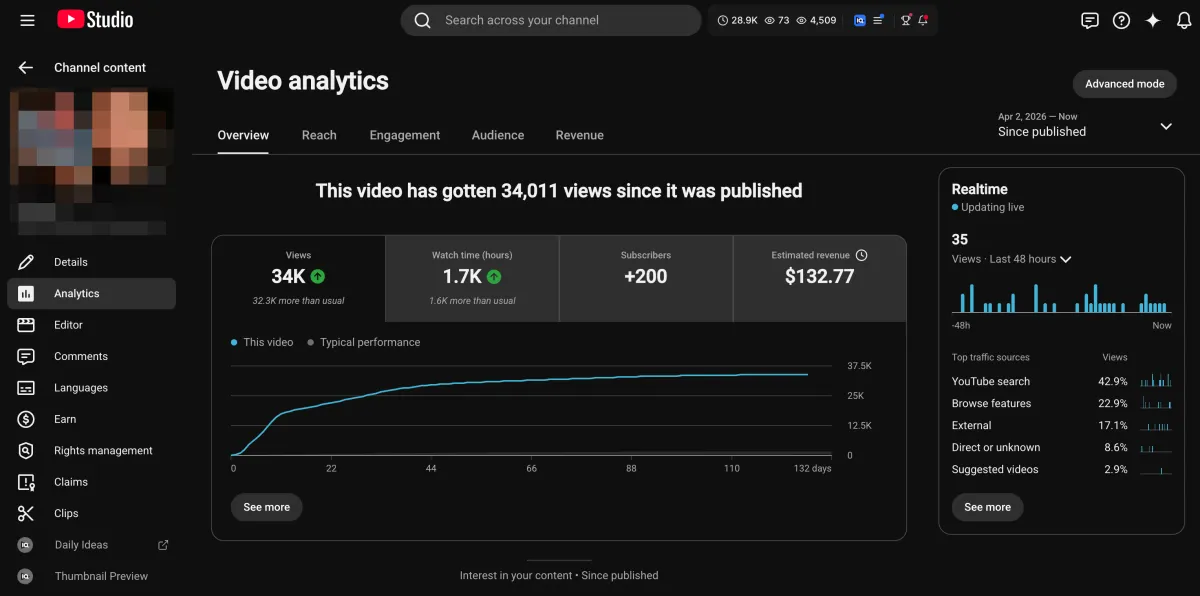
Learn how I turned a $132.77 video into $1000+ per month asset
Full case study on how you can replicate my success with YouTube SEO strategy.
Free downloadThe Zero Audience System
Build permanent YouTube income without a camera or an audience
The full methodology, 31 lessons plus bonuses. Limited spots.